本页还没有译文
本页 23 段还没译成简体中文,下面显示的是英文原文。S3 Authentication
还没翻译译自英文(supabase.com)本页 23 段都还没译
You have two options to authenticate with Supabase Storage S3:
- Using the generated S3 access keys from your project settings (Intended exclusively for server-side use)
- Using a Session Token, which will allow you to authenticate with a user JWT token and provide limited access via Row Level Security (RLS).
S3 access keys
Keep these credentials secure
S3 access keys provide full access to all S3 operations across all buckets and bypass RLS policies. These are meant to be used only on the server.
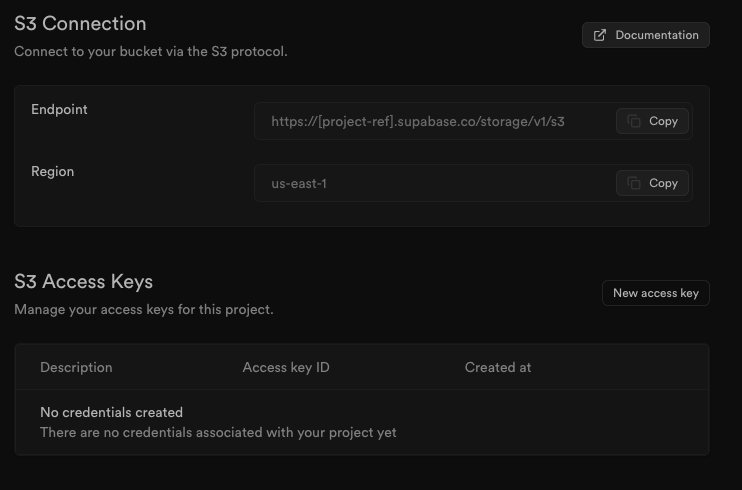
To authenticate with S3, generate a pair of credentials (Access Key ID and Secret Access Key), copy the endpoint and region from the S3 configuration page.
This is all the information you need to connect to Supabase Storage using any S3-compatible service.
Note
For optimal performance when uploading large files you should always use the direct storage hostname. This provides several performance enhancements that will greatly improve performance when uploading large files.
Instead of https://project-id.supabase.co use https://project-id.storage.supabase.co
import { S3Client } from '@aws-sdk/client-s3';

const client = new S3Client({
  forcePathStyle: true,
  region: 'project_region',
  endpoint: 'https://project_ref.storage.supabase.co/storage/v1/s3',
  credentials: {
    accessKeyId: 'your_access_key_id',
    secretAccessKey: 'your_secret_access_key',
  }
})
# ~/.aws/credentials
[supabase]
aws_access_key_id = your_access_key_id
aws_secret_access_key = your_secret_access_key
endpoint_url = https://project_ref.storage.supabase.co/storage/v1/s3
region = project_regionNote
On local development, use these values:
region:localendpoint: IP and port e.g.http://127.0.0.1:54321/storage/v1/s3
Session token
You can authenticate to Supabase S3 with a user JWT token to provide limited access via RLS to all S3 operations. This is useful when you want initialize the S3 client on the server scoped to a specific user, or use the S3 client directly from the client side.
All S3 operations performed with the Session Token are scoped to the authenticated user. RLS policies on the Storage Schema are respected.
To authenticate with S3 using a Session Token, use the following credentials:
- access_key_id:
project_ref - secret_access_key:
anonKey(publishableKeyis not yet supported) - session_token:
valid jwt token
For example, using the aws-sdk library:
Note
Typically we advise against using getSession, because the session is read from local storage and you can't trust its claims for auth decisions. In this case however, the code only needs the raw access token string to forward as a credential to the S3 service, which validates the token server-side. Since no client-side auth decision is made based on the session data, getSession is appropriate here.
import { S3Client } from '@aws-sdk/client-s3'

const {
  data: { session },
} = await supabase.auth.getSession()

const client = new S3Client({
  forcePathStyle: true,
  region: 'project_region',
  endpoint: 'https://project_ref.storage.supabase.co/storage/v1/s3',
  credentials: {
    accessKeyId: 'project_ref',
    secretAccessKey: 'anonKey',
    sessionToken: session.access_token,
  },
})
Note
- On self-hosted Supabase, the
accessKeyIdis theSTORAGE_TENANT_IDenvironment variable defined in the.envfile. Refer to the self-hosted S3 guide for more details. - On local development, use the following values:
region:localendpoint: IP and port e.g.http://127.0.0.1:54321/storage/v1/s3accessKeyId:stubsecretAccessKey: useANON_KEYvalue fromsupabase status -o env