本页还没有译文
本页 73 段还没译成Español,下面显示的是英文原文。Native Mobile Deep Linking
还没翻译译自英文(supabase.com)本页 73 段都还没译
Many Auth methods involve a redirect to your app. For example:
- Signup confirmation emails, Magic Link signins, and password reset emails contain a link that redirects to your app.
- In OAuth signins, an automatic redirect occurs to your app.
With Deep Linking, you can configure this redirect to open a specific page. This is necessary if, for example, you need to display a form for password reset, or to manually exchange a token hash.
Setting up deep linking
Expo React NativeFlutterSwiftAndroid Kotlin
To link to your development build or standalone app, you need to specify a custom URL scheme for your app. You can register a scheme in your app config (app.json, app.config.js) by adding a string under the scheme key:
{
  "expo": {
    "scheme": "com.supabase"
  }
}
In your project's auth settings add the redirect URL, e.g. com.supabase://**.
Finally, implement the OAuth and linking handlers. See the supabase-js reference for instructions on initializing the supabase-js client in React Native.
import { Button } from "react-native";
import { makeRedirectUri } from "expo-auth-session";
import * as QueryParams from "expo-auth-session/build/QueryParams";
import * as WebBrowser from "expo-web-browser";
import * as Linking from "expo-linking";
import { supabase } from "app/utils/supabase";

WebBrowser.maybeCompleteAuthSession(); // required for web only
const redirectTo = makeRedirectUri();

const createSessionFromUrl = async (url: string) => {
  const { params, errorCode } = QueryParams.getQueryParams(url);

  if (errorCode) throw new Error(errorCode);
  const { access_token, refresh_token } = params;

  if (!access_token) return;

  const { data, error } = await supabase.auth.setSession({
    access_token,
    refresh_token,
  });
  if (error) throw error;
  return data.session;
};

const performOAuth = async () => {
  const { data, error } = await supabase.auth.signInWithOAuth({
    provider: "github",
    options: {
      redirectTo,
      skipBrowserRedirect: true,
    },
  });
  if (error) throw error;

  const res = await WebBrowser.openAuthSessionAsync(
    data?.url ?? "",
    redirectTo
  );

  if (res.type === "success") {
    const { url } = res;
    await createSessionFromUrl(url);
  }
};

const sendMagicLink = async () => {
  const { error } = await supabase.auth.signInWithOtp({
    email: "valid.email@supabase.io",
    options: {
      emailRedirectTo: redirectTo,
    },
  });

  if (error) throw error;
  // Email sent.
};

export default function Auth() {
  // Handle linking into app from email app.
  const url = Linking.useLinkingURL();
  if (url) createSessionFromUrl(url);

  return (
    <>
      <Button onPress={performOAuth} title="Sign in with GitHub" />
      <Button onPress={sendMagicLink} title="Send Magic Link" />
    </>
  );
}
For the best user experience it is recommended to use universal links which require a more elaborate setup. You can find the detailed setup instructions in the Expo docs.
// Currently supabase_flutter supports deep links on Android, iOS, Web, macOS and Windows.
Deep link config
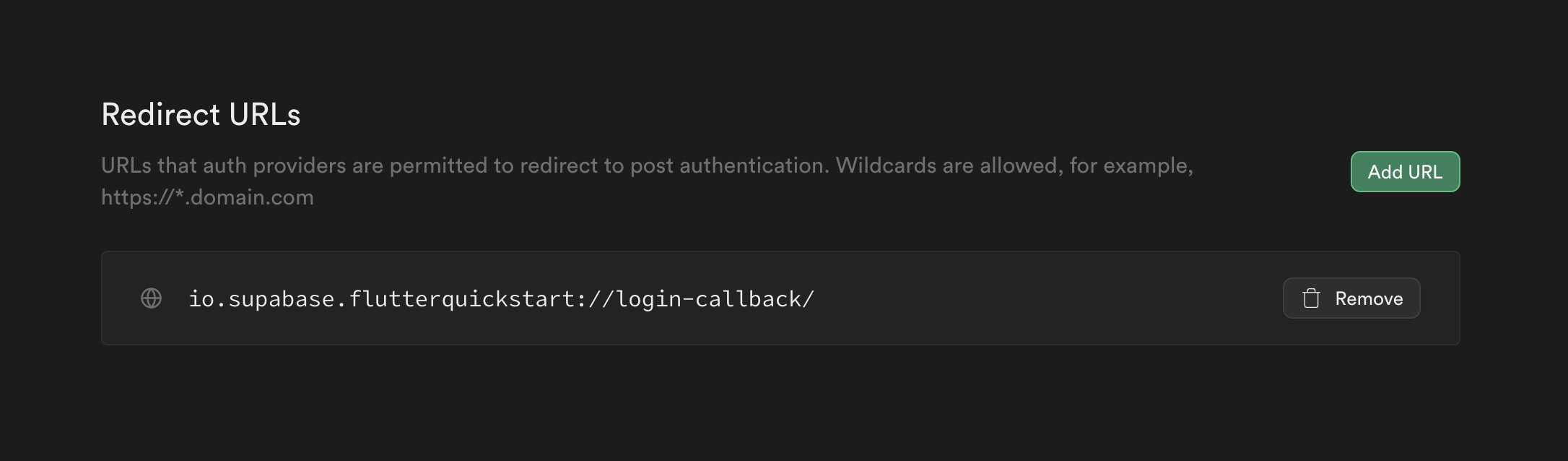
- Go to your auth settings page.
- You need to enter your app redirect callback on
Additional Redirect URLsfield.
The redirect callback URL should have this format [YOUR_SCHEME]://[YOUR_HOSTNAME]. Here, io.supabase.flutterquickstart://login-callback is an example. You can choose whatever you would like for YOUR_SCHEME and YOUR_HOSTNAME as long as the scheme is unique across the user's device. For this reason, typically a reverse domain of your website is used.
Platform specific config
AndroidiOSWindowsmacOS
<manifest ...>
  <!-- ... other tags -->
  <application ...>
    <activity ...>
      <!-- ... other tags -->

      <!-- Deep Links -->
      <intent-filter>
        <action android:name="android.intent.action.VIEW" />
        <category android:name="android.intent.category.DEFAULT" />
        <category android:name="android.intent.category.BROWSABLE" />
        <!-- Accepts URIs that begin with YOUR_SCHEME://YOUR_HOST -->
        <data
          android:scheme="YOUR_SCHEME"
          android:host="YOUR_HOSTNAME" />
      </intent-filter>
    </activity>
  </application>
</manifest>
The android:host attribute is optional for Deep Links.
For more info: https://developer.android.com/training/app-links/deep-linking
For Custom URL schemes you need to declare the scheme in
ios/Runner/Info.plist (or through Xcode's Target Info editor,
under URL Types):
<!-- ... other tags -->
<plist>
<dict>
  <!-- ... other tags -->
  <key>CFBundleURLTypes</key>
  <array>
    <dict>
      <key>CFBundleTypeRole</key>
      <string>Editor</string>
      <key>CFBundleURLSchemes</key>
      <array>
        <string>[YOUR_SCHEME]</string>
      </array>
    </dict>
  </array>
  <!-- ... other tags -->
</dict>
</plist>
For more info: https://developer.apple.com/documentation/xcode/defining-a-custom-url-scheme-for-your-app
Universal links
For a better user experience, you can use Universal Links instead of custom URL schemes. Universal Links allow your app to open directly from web links without showing a browser redirect prompt.
To enable Universal Links, you need to:
-
Configure Associated Domains in your Xcode project:
- Add your domain to the Associated Domains capability
- Format:
applinks:yourdomain.com
-
Host the Apple App Site Association (AASA) file on your own infrastructure:
- The file must be accessible at
https://yourdomain.com/.well-known/apple-app-site-associationorhttps://yourdomain.com/apple-app-site-association - The file must be served with
Content-Type: application/json(ortext/json) - The file must be accessible over HTTPS without redirects
- The file should not have a file extension
- The file must be accessible at
Caution
Supabase does not currently support hosting the AASA file. You must host this file on your own infrastructure following Apple's best practices.
The AASA file format should look like this:
{
  "applinks": {
    "apps": [],
    "details": [
      {
        "appID": "TEAM_ID.BUNDLE_ID",
        "paths": ["*"]
      }
    ]
  }
}
Replace TEAM_ID with your Apple Developer Team ID and BUNDLE_ID with your app's bundle identifier.
For detailed setup instructions, see Apple's documentation on supporting associated domains.
Setting up deep links in Windows has few more steps than other platforms. Learn more
Declare this method in <PROJECT_DIR>\windows\runner\win32_window.h
  // Dispatches link if any.
  // This method enables our app to be with a single instance too.
  // This is optional but mandatory if you want to catch further links in same app.
  bool SendAppLinkToInstance(const std::wstring& title);
Add this inclusion at the top of <PROJECT_DIR>\windows\runner\win32_window.cpp
#include "app_links_windows/app_links_windows_plugin.h"Add this method in <PROJECT_DIR>\windows\runner\win32_window.cpp
bool Win32Window::SendAppLinkToInstance(const std::wstring& title) {
  // Find our exact window
  HWND hwnd = ::FindWindow(kWindowClassName, title.c_str());

  if (hwnd) {
    // Dispatch new link to current window
    SendAppLink(hwnd);

    // (Optional) Restore our window to front in same state
    WINDOWPLACEMENT place = { sizeof(WINDOWPLACEMENT) };
    GetWindowPlacement(hwnd, &place);
    switch(place.showCmd) {
      case SW_SHOWMAXIMIZED:
          ShowWindow(hwnd, SW_SHOWMAXIMIZED);
          break;
      case SW_SHOWMINIMIZED:
          ShowWindow(hwnd, SW_RESTORE);
          break;
      default:
          ShowWindow(hwnd, SW_NORMAL);
          break;
    }
    SetWindowPos(0, HWND_TOP, 0, 0, 0, 0, SWP_SHOWWINDOW | SWP_NOSIZE | SWP_NOMOVE);
    SetForegroundWindow(hwnd);
    // END Restore

    // Window has been found, don't create another one.
    return true;
  }

  return false;
}
Add the call to the previous method in CreateAndShow
bool Win32Window::CreateAndShow(const std::wstring& title,
                                const Point& origin,
                                const Size& size) {
if (SendAppLinkToInstance(title)) {
    return false;
}

...
At this point, you can register your own scheme. On Windows, URL protocols are setup in the Windows registry.
This package won't do it for you.
You can achieve it with url_protocol inside you app.
The most relevant solution is to include those registry modifications into your installer to allow for deregistration.
Add this XML chapter in your macos/Runner/Info.plist inside <plist version="1.0"><dict> chapter:
<!-- ... other tags -->
<plist version="1.0">
<dict>
  <!-- ... other tags -->
  <key>CFBundleURLTypes</key>
  <array>
      <dict>
          <key>CFBundleURLName</key>
          <!-- abstract name for this URL type (you can leave it blank) -->
          <string>sample_name</string>
          <key>CFBundleURLSchemes</key>
          <array>
              <!-- your schemes -->
              <string>sample</string>
          </array>
      </dict>
  </array>
  <!-- ... other tags -->
</dict>
</plist>
Deep link config
- Go to your auth settings page.
- Enter your app redirect URL in the
Additional Redirect URLsfield. This is the URL that the user gets redirected to after clicking a magic link.
The redirect callback URL should have the format [YOUR_SCHEME]://[YOUR_HOSTNAME]. Here, io.supabase.user-management://login-callback is an example. You can choose whatever you would like for YOUR_SCHEME and YOUR_HOSTNAME as long as the scheme is unique across the user's device. For this reason, typically a reverse domain of your website is used.
Now add a custom URL to your application, so the OS knows how to redirect back your application once the user clicks the magic link.
You have the option to use Xcode's Target Info Editor following official Apple documentation.
Or, declare the URL scheme manually in your Info.plist file.
  <?xml version="1.0" encoding="UTF-8"?>
  <!DOCTYPE plist PUBLIC "-//Apple//DTD PLIST 1.0//EN" "http://www.apple.com/DTDs/PropertyList-1.0.dtd">
  <plist version="1.0">
  <dict>
    <!-- other tags -->
    <key>CFBundleURLTypes</key>
    <array>
      <dict>
        <key>CFBundleTypeRole</key>
        <string>Editor</string>
        <key>CFBundleURLSchemes</key>
        <array>
          <string>io.supabase.user-management</string>
        </array>
      </dict>
    </array>
  </dict>
  </plist>
Handling the incoming URL
Once the OS opens your app via the redirect URL, pass that URL to supabase.auth.handle(_:) to complete the sign-in.
SwiftUI
Use the onOpenURL view modifier on your root view:
SomeView()
  .onOpenURL { url in
    supabase.auth.handle(url)
  }
UIKit: App delegate
Forward the URL from application(_:open:options:), and from didFinishLaunchingWithOptions if the app was launched cold via the link:
func application(
  _ application: UIApplication,
  didFinishLaunchingWithOptions launchOptions: [UIApplication.LaunchOptionsKey: Any]?
) -> Bool {
  if let url = launchOptions?[.url] as? URL {
    supabase.auth.handle(url)
  }

  return true
}

func application(
  _ app: UIApplication,
  open url: URL,
  options: [UIApplication.OpenURLOptionsKey: Any]
) -> Bool {
  supabase.auth.handle(url)
  return true
}
UIKit: Scene delegate
Forward the URL from SceneDelegate.swift, handling both a cold launch (via scene(_:willConnectTo:options:)) and a URL received while the scene is already running (via scene(_:openURLContexts:)):
func scene(
  _ scene: UIScene,
  willConnectTo session: UISceneSession,
  options connectionOptions: UIScene.ConnectionOptions
) {
  for context in connectionOptions.urlContexts {
    supabase.auth.handle(context.url)
  }
}

func scene(_ scene: UIScene, openURLContexts URLContexts: Set<UIOpenURLContext>) {
  guard let url = URLContexts.first?.url else { return }
  supabase.auth.handle(url)
}
handle(_:) is a convenience wrapper that calls session(from:) and logs any error. See the Auth API reference for details, or call session(from:) directly if you need the returned Session or want control over error handling.
Universal links
For a better user experience, you can use Universal Links instead of custom URL schemes. Universal Links allow your app to open directly from web links without showing a browser redirect prompt.
To enable Universal Links, you need to:
-
Configure Associated Domains in your Xcode project:
- Add your domain to the Associated Domains capability
- Format:
applinks:yourdomain.com
-
Host the Apple App Site Association (AASA) file on your own infrastructure:
- The file must be accessible at
https://yourdomain.com/.well-known/apple-app-site-associationorhttps://yourdomain.com/apple-app-site-association - The file must be served with
Content-Type: application/json(ortext/json) - The file must be accessible over HTTPS without redirects
- The file should not have a file extension
- The file must be accessible at
Caution
Supabase does not currently support hosting the AASA file. You must host this file on your own infrastructure following Apple's best practices.
The AASA file format should look like this:
{
  "applinks": {
    "apps": [],
    "details": [
      {
        "appID": "TEAM_ID.BUNDLE_ID",
        "paths": ["*"]
      }
    ]
  }
}
Replace TEAM_ID with your Apple Developer Team ID and BUNDLE_ID with your app's bundle identifier.
For detailed setup instructions, see Apple's documentation on supporting associated domains.
Deep link config
- Go to your auth settings page.
- Enter your app redirect URL in the
Additional Redirect URLsfield. This is the URL that the user gets redirected to after clicking a magic link.
The redirect callback URL must have the format [YOUR_SCHEME]://[YOUR_HOSTNAME]. For example: io.supabase.user-management://login-callback. You can use any values for YOUR_SCHEME and YOUR_HOSTNAME, but the scheme must be unique across the user's device. For this reason, a reverse domain of your website is typically used.
Now, edit the Android manifest to make sure the app opens when the user clicks on the magic link.
<manifest ...>
  <!-- ... other tags -->
  <application ...>
    <activity ...>
      <!-- ... other tags -->

      <!-- Deep Links -->
      <intent-filter>
        <action android:name="android.intent.action.VIEW" />
        <category android:name="android.intent.category.DEFAULT" />
        <category android:name="android.intent.category.BROWSABLE" />
        <!-- Accepts URIs that begin with YOUR_SCHEME://YOUR_HOST -->
        <data
          android:scheme="YOUR_SCHEME"
          android:host="YOUR_HOSTNAME" />
      </intent-filter>
    </activity>
  </application>
</manifest>
Check the Android documentation for more information.
Next, specify the scheme and host in the Supabase Client:
install(Auth) {
   host = "login-callback"
   scheme = "io.supabase.user-management"
}
Finally, call Auth#handleDeeplinks when the app opens:
override fun onCreate(savedInstanceState: Bundle?) {
    super.onCreate(savedInstanceState)
    supabase.handleDeeplinks(intent)
}
The user will now be authenticated when your app receives a valid deep link!