本页还没有译文
本页 43 段还没译成简体中文,下面显示的是英文原文。Integrate X.ai (Grok) with Langfuse
还没翻译译自英文(langfuse.com)本页 43 段都还没译
Observability for xAI / Grok with Langfuse
This guide shows you how to integrate Grok with Langfuse using the OpenAI SDK.
What is Grok? Grok is X.ai’s advanced AI platform that streamlines natural language processing for intelligent application integration. Learn more at Grok Documentation.
What is Langfuse? Langfuse is an open source AI engineering platform that helps teams trace API calls, monitor performance, and debug issues in their LLM applications. Use Langfuse Cloud (hosted by Langfuse, free tier, no infrastructure to run) or self-host it.
Step 1: Install Dependencies
Make sure you have installed the necessary Python packages:
%pip install openai langfuseStep 2: Set Up Environment Variables
import os

# Get keys for your project from the project settings page
# https://cloud.langfuse.com

os.environ.setdefault("LANGFUSE_PUBLIC_KEY", "pk-lf-...");
os.environ.setdefault("LANGFUSE_SECRET_KEY", "sk-lf-...");
os.environ.setdefault("LANGFUSE_BASE_URL", "https://cloud.langfuse.com"); # 🇪🇺 EU region
# Other Langfuse data regions include 🇺🇸 US: https://us.cloud.langfuse.com, 🇯🇵 Japan: https://jp.cloud.langfuse.com and ⚕️ HIPAA: https://hipaa.cloud.langfuse.com


# Get your Grok API key from your Grok account settings
os.environ.setdefault("GROK_API_KEY", "xai-...");
Step 3: Use Grok with the OpenAI SDK
To utilize Grok through the OpenAI SDK, we use the Langfuse drop-in replacement for OpenAI. Replace the base URL with Grok’s endpoint.
# Instead of importing openai directly:
from langfuse.openai import openai

client = openai.OpenAI(
  api_key=os.environ.get("GROK_API_KEY"),
  base_url="https://api.x.ai/v1"  # Grok's endpoint
)
Step 4: Run an Example
The following example demonstrates how to make a simple request using Grok's API. All API calls will be automatically traced by Langfuse.
response = client.chat.completions.create(
  model="grok-2-latest",
  messages=[
    {"role": "system", "content": "You are an assistant."},
    {"role": "user", "content": "What is Langfuse?"}
  ],
  name = "Grok-2-Trace"
)

print(response.choices[0].message.content)
Step 5: Enhance Tracing (Optional)
You can enhance your Grok traces:
- Add metadata, tags, log levels and user IDs to traces
- Group traces by sessions
@observe()decorator to trace additional application logic- Use Langfuse Prompt Management and link prompts to traces
- Add score to traces
Visit the OpenAI SDK integration docs to see more examples on passing additional parameters. Find out more about Langfuse Evaluations and Prompt Management in the Langfuse documentation.
Step 6: See Traces in Langfuse
After running the example, log in to Langfuse to view the detailed traces, including:
- Request parameters
- Response content
- Token usage and latency metrics
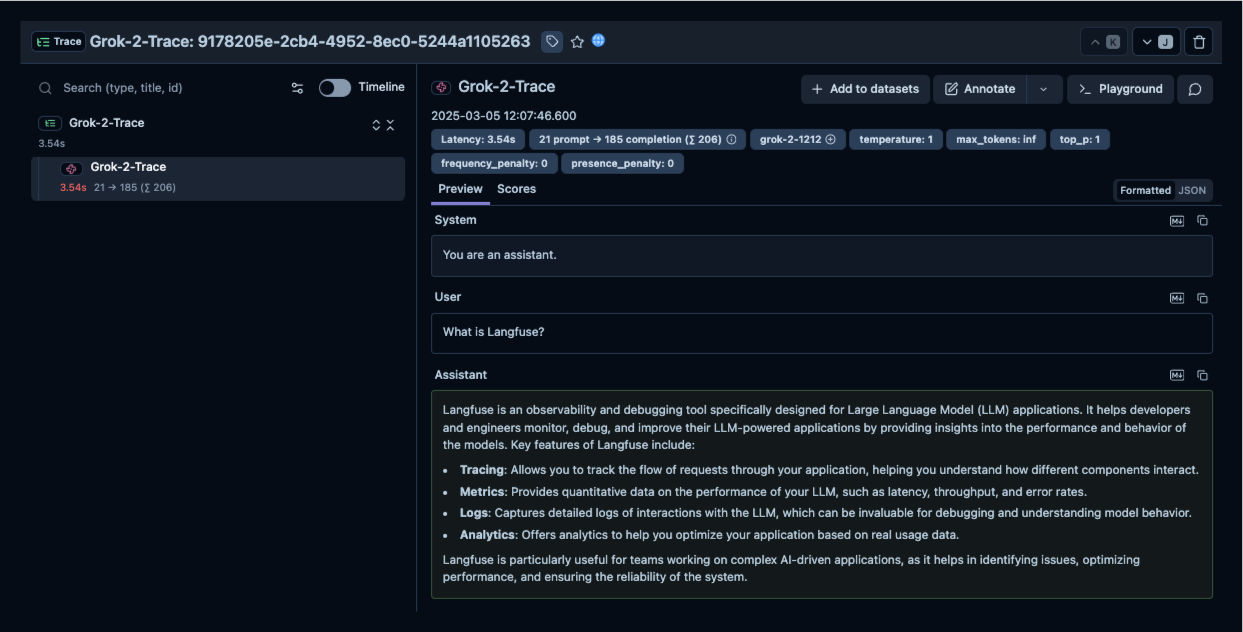
Public example trace link in Langfuse
Interoperability with the Python SDK
You can use this integration together with the Langfuse SDKs to add additional attributes to the observation.
The @observe() decorator provides a convenient way to automatically wrap your instrumented code and add additional attributes to the observation.
from langfuse import observe, propagate_attributes, get_client

langfuse = get_client()

@observe()
def my_llm_pipeline(input):
    # Add additional attributes (user_id, session_id, metadata, version, tags) to all spans created within this execution scope
    with propagate_attributes(
        user_id="user_123",
        session_id="session_abc",
        tags=["agent", "my-observation"],
        metadata={"email": "user@langfuse.com"},
        version="1.0.0"
    ):

        # YOUR APPLICATION CODE HERE
        result = call_llm(input)

        return result

# Run the function
my_llm_pipeline("Hi")
Learn more about using the Decorator in the Langfuse SDK instrumentation docs.
The Context Manager allows you to wrap your instrumented code using context managers (with with statements), which allows you to add additional attributes to the observation.
from langfuse import get_client, propagate_attributes

langfuse = get_client()

with langfuse.start_as_current_observation(
    as_type="span",
    name="my-observation",
    trace_context={"trace_id": "abcdef1234567890abcdef1234567890"},  # Must be 32 hex chars
) as observation:

    # Add additional attributes (user_id, session_id, metadata, version, tags)
    # to all observations created within this execution scope
    with propagate_attributes(
        user_id="user_123",
        session_id="session_abc",
        metadata={"experiment": "variant_a", "env": "prod"},
        version="1.0",
    ):
        # YOUR APPLICATION CODE HERE
        result = call_llm("some input")

# Flush events in short-lived applications
langfuse.flush()
Learn more about using the Context Manager in the Langfuse SDK instrumentation docs.
Troubleshooting
No observations appearing
First, enable debug mode in the Python SDK:
export LANGFUSE_DEBUG="True"Then run your application and check the debug logs:
- OTel observations appear in the logs: Your application is instrumented correctly but observations are not reaching Langfuse. To resolve this:
- Call
langfuse.flush()at the end of your application to ensure all observations are exported. - Verify that you are using the correct API keys and base URL.
- Call
- No OTel spans in the logs: Your application is not instrumented correctly. Make sure the instrumentation runs before your application code.
Unwanted observations in Langfuse
The Langfuse SDK is based on OpenTelemetry. Other libraries in your application may emit OTel spans that are not relevant to you. These still count toward your billable units, so you should filter them out. See Unwanted spans in Langfuse for details.
Missing attributes
Some attributes may be stored in the metadata object of the observation rather than being mapped to the Langfuse data model. If a mapping or integration does not work as expected, please raise an issue on GitHub.
Next Steps
Once you have instrumented your code, you can manage, evaluate and debug your application:
Manage prompts in Langfuse Add evaluation scores Run LLM-as-a-judge Evaluators Create datasets Create custom dashboards Test queries in the Playground