本页还没有译文
本页 100 段还没译成简体中文,下面显示的是英文原文。Code evaluators
还没翻译译自英文(langfuse.com)本页 100 段都还没译
Where is this feature available?
- Hobby: Available
- Core: Available
- Pro: Available
- Enterprise: Available
- Self Hosted: Available
Note
Self-hosted: Code evaluators require a configured code evaluator dispatcher. They are disabled when no dispatcher is set.
Note
Code evaluators require observations ingested with an OpenTelemetry-based SDK: Python SDK v3+ or JS/TS SDK v4+. If needed, see the Python v2 → v3 migration guide or JS/TS v3 → v4 migration guide.
Code evaluators run custom Python or TypeScript logic in Langfuse and return one or more scores. Use them for deterministic, objective checks where code is more reliable than a model-based judgment.
Common examples include exact match checks, regex validation, JSON parseability, schema validation, keyword checks, tool-call checks, and custom business rules.
Use LLM-as-a-Judge instead when the evaluation needs semantic judgment, rubric-based reasoning, or subjective assessment such as helpfulness, tone, or answer quality. To score live production traces with an evaluator and a rule, start with Evaluate Production Traffic.
How to use code evaluators?
Code evaluators can run on two types of data: Observations (individual operations from live production traffic) or Experiments (controlled test datasets). Your choice depends on whether you're testing in development or monitoring production.
Decision tree
Which data needs deterministic evaluation?
↓
Live production data Monitor real-time traffic
↓
Observations Individual operations: LLM calls, retrievals, tool calls
Offline experiment data Test in controlled environment
↓
Experiments Controlled test cases with datasets
Note
Production pattern: Teams typically use Experiments during development to validate deterministic checks, then deploy Observation-level evaluators in production for scalable monitoring.
Understanding each evaluation target
Run evaluators on individual observations within your traces, such as LLM calls, retrieval operations, embedding generations, or tool calls.
Use the Is Root Observation filter to target logical roots: observations without a physical parent or observations explicitly marked as application roots by the SDK. A logical root may still have a physical parent; use a name or type filter when you need a specific operation instead.
Why target observations
- Operation-level precision: Filter by observation type to evaluate only the operations that matter, not complete traces.
- Deterministic production monitoring: Check JSON validity, schema compliance, exact matches, or business rules on live traffic.
- Compositional evaluation: Run different code evaluators on different operations within one trace.
- Combined filtering: Stack observation filters with trace filters such as
userId,sessionId, tags, version, and metadata.
Data flow
When an incoming observation matches a rule's filters, the rule triggers its attached code evaluators. Scores are attached to the specific observation.
Example use cases
- Validate that final LLM responses are parseable JSON
- Check whether a tool call includes required arguments
- Enforce custom business rules for selected model calls
Run evaluators on controlled test datasets to compare model versions, prompt variations, or system configurations in a reproducible environment.
Why target experiments
- You need deterministic pass/fail checks for development workflows
- You want to compare multiple prompt versions or model configurations
- You have datasets with expected outputs or metadata that your evaluator should inspect
Data flow
Each experiment run generates traces and observations that can be scored by your selected evaluators. The evaluator receives observation data plus experiment item context, such as expected output and item metadata.
- Create a dataset with test inputs and, optionally, expected outputs.
- Run an experiment via UI or SDK. See Experiments via UI or Experiments via SDK.
- Select code evaluators to score the generated observations.
- Compare results across experiment runs to make data-driven decisions.
Example use case
- Compare two prompt versions on a dataset of support questions and check whether each response contains the required JSON fields
Set up step-by-step
Create a code evaluator
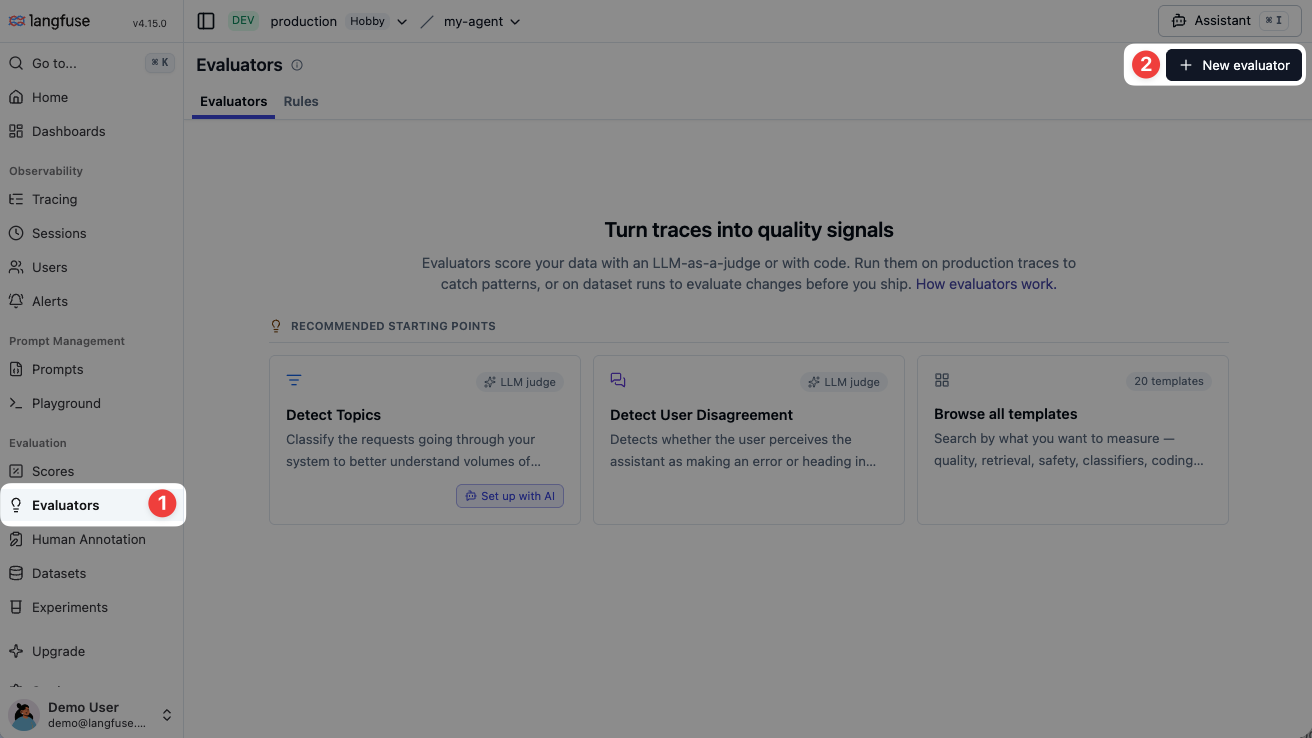
Go to the Evaluators page and click New evaluator. In the template gallery, choose Code evaluator, then select Python or TypeScript.
Define and test the evaluator
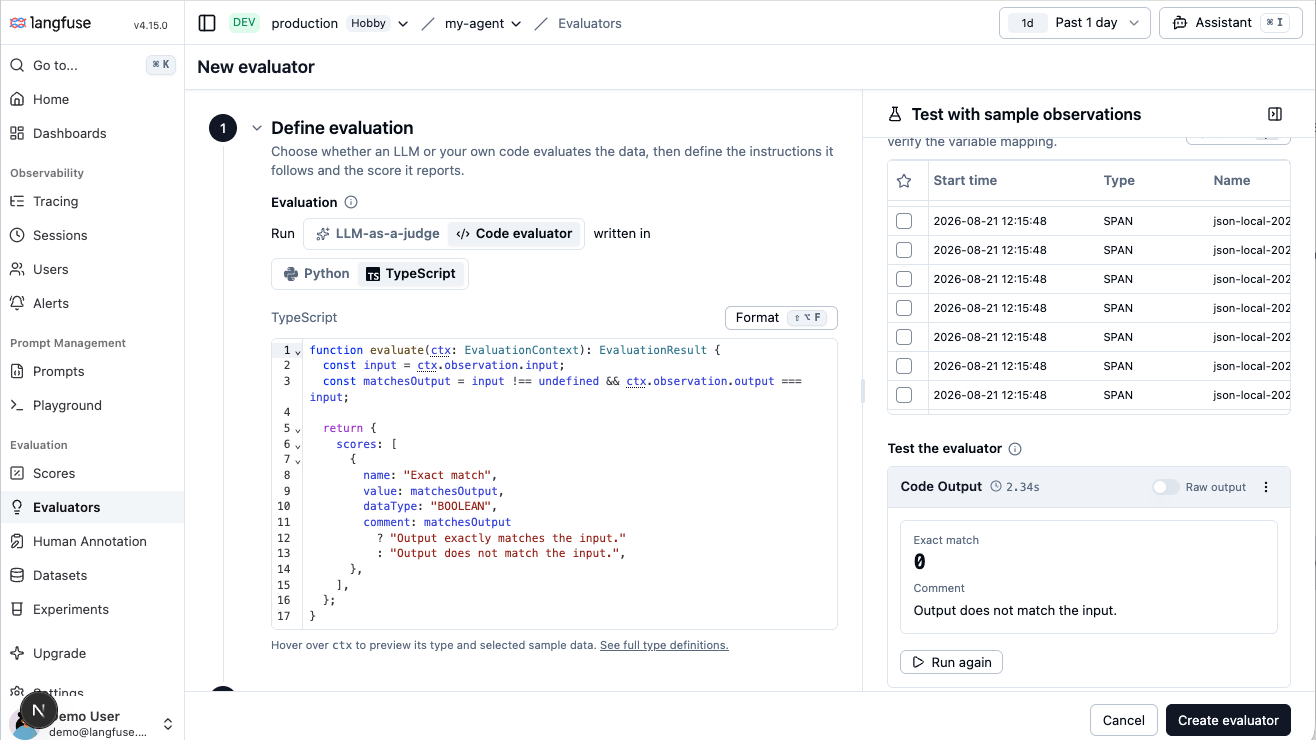
The evaluator definition contains the language and evaluate function that Langfuse runs. Rules select the incoming observations on which it runs.
Implement the evaluate function. Keep the code deterministic and within the runtime constraints.
On the right, filter to representative sample observations, select one, and run the evaluator. Use the test result to confirm that the observation and experiment fields passed to ctx match what your code expects.
Unlike LLM-as-a-Judge, code evaluators do not have a separate variable-mapping step. Your code reads the data it needs directly from ctx.
Save the evaluator
After saving, you can:
- Create a rule from the filters you used to select test samples, or attach the evaluator to an existing rule to run it on incoming observations.
- Continue without a rule. You can still use the evaluator for batch evaluation or prompt experiments.
Function contract
Each evaluator exposes an evaluate function. Langfuse passes an EvaluationContext and expects an EvaluationResult with one or more scores.
from dataclasses import dataclass, field
from typing import Any


@dataclass
class ToolCall:
    id: str = ""
    name: str = ""
    arguments: Any = None
    type: str = ""
    index: int = 0


@dataclass
class ObservationContext:
    input: Any = None
    output: Any = None
    metadata: Any = None
    tool_calls: list[ToolCall] = field(default_factory=list)


@dataclass
class ExperimentContext:
    item_expected_output: Any = None
    item_metadata: Any = None


@dataclass
class EvaluationContext:
    observation: ObservationContext
    experiment: ExperimentContext | None = None


@dataclass
class Score:
    name: str
    value: int | float | str | bool
    data_type: str
    comment: str | None = None
    config_id: str | None = None
    metadata: dict[str, Any] | None = None


@dataclass
class EvaluationResult:
    scores: list[Score]


def evaluate(ctx: EvaluationContext) -> EvaluationResult:
    output_present = ctx.observation.output is not None

    return EvaluationResult(
        scores=[
            Score(
                name="Output present",
                value=output_present,
                data_type="BOOLEAN",
                comment=(
                    "Observation output is present."
                    if output_present
                    else "Observation output is missing."
                ),
                metadata={"rule": "output_present"},
            )
        ]
    )
type ToolCall = {
id: string;
name: string;
arguments: unknown;
type: string;
index: number;
};
type EvaluationContext = {
observation: {
input: any;
output: any;
metadata: any;
toolCalls: ToolCall[];
};
experiment:
| {
itemExpectedOutput: any;
itemMetadata: any;
}
| undefined;
};
type ScoreBase = {
name: string;
comment?: string;
configId?: string | null;
metadata?: Record<string, unknown>;
};
type NumericScore = ScoreBase & {
dataType: "NUMERIC";
value: number;
};
type BooleanScore = ScoreBase & {
dataType: "BOOLEAN";
value: boolean;
};
type CategoricalScore = ScoreBase & {
dataType: "CATEGORICAL";
value: string;
};
type TextScore = ScoreBase & {
dataType: "TEXT";
value: string;
};
type Score = NumericScore | BooleanScore | CategoricalScore | TextScore;
type EvaluationResult = {
scores: Score[];
};
function evaluate({
observation: { input, output, metadata, toolCalls },
experiment,
}: EvaluationContext): EvaluationResult {
const itemExpectedOutput = experiment?.itemExpectedOutput;
const itemMetadata = experiment?.itemMetadata;
const outputPresent = output != null;
return {
scores: [
{
name: "Output present",
value: outputPresent,
dataType: "BOOLEAN",
comment: outputPresent
? "Observation output is present."
: "Observation output is missing.",
metadata: {
rule: "output_present",
hasInput: input != null,
hasObservationMetadata: metadata != null,
toolCallCount: toolCalls.length,
hasExpectedOutput: itemExpectedOutput != null,
hasExperimentMetadata: itemMetadata != null,
},
},
],
};
}Context fields
| Field | Description |
|---|---|
ctx.observation.input | The input recorded on the observation selected by the evaluator target. |
ctx.observation.output | The output recorded on the observation selected by the evaluator target. |
ctx.observation.metadata | The metadata recorded on the observation. |
ctx.observation.tool_calls (Python) / ctx.observation.toolCalls (TypeScript) | Ordered calls with id, name, arguments, type, and index. Valid JSON arguments are parsed. |
ctx.experiment | Present only when the evaluator runs on an experiment. |
ctx.experiment.item_expected_output (Python) / ctx.experiment.itemExpectedOutput (TypeScript) | Expected output from the experiment item. |
ctx.experiment.item_metadata (Python) / ctx.experiment.itemMetadata (TypeScript) | Metadata from the experiment item. |
Score fields
| Field | Description |
|---|---|
name | Required score name. |
value | Required score value. |
data_type / dataType | Required score data type. Supported values are NUMERIC, CATEGORICAL, BOOLEAN, and TEXT. |
comment | Optional reasoning or explanation stored with the score. |
config_id / configId | Optional score config ID. When provided, the score must satisfy the referenced score config. |
metadata | Optional metadata stored with the score. |
Example: Exact match
This example returns a boolean score that passes when the observation output exactly matches the experiment item's expected output.
def evaluate(ctx: EvaluationContext) -> EvaluationResult:
    """Evaluates one observation and returns one or more Langfuse scores."""
    expected_output = (
        ctx.experiment.item_expected_output if ctx.experiment is not None else None
    )
    matches_expected_output = (
        expected_output is not None and ctx.observation.output == expected_output
    )

    return EvaluationResult(
        scores=[
            Score(
                name="Exact match",
                value=matches_expected_output,
                data_type="BOOLEAN",
                comment=(
                    "Output exactly matches the expected output."
                    if matches_expected_output
                    else "Output does not match the expected output."
                ),
            )
        ]
    )
/**
* Evaluates one observation and returns one or more Langfuse scores.
*/
function evaluate({
observation: { input, output, metadata },
experiment,
}: EvaluationContext): EvaluationResult {
const itemExpectedOutput = experiment?.itemExpectedOutput;
const itemMetadata = experiment?.itemMetadata;
const matchesExpectedOutput =
itemExpectedOutput != null && output === itemExpectedOutput;
return {
scores: [
{
name: "Exact match",
value: matchesExpectedOutput,
dataType: "BOOLEAN",
comment: matchesExpectedOutput
? "Output exactly matches the expected output."
: "Output does not match the expected output.",
metadata: {
hasInput: input != null,
hasObservationMetadata: metadata != null,
hasExperimentMetadata: itemMetadata != null,
},
},
],
};
}Debug code evaluator executions
Every code evaluator execution creates a trace, giving you complete visibility into the evaluation process. This lets you inspect the selected inputs and outputs, experiment context, runtime latency, returned scores, logs, and errors.
You can show code evaluator execution traces by filtering for the environment langfuse-code-eval in the tracing table:

Use the evaluator test run before enabling a new evaluator. It is the fastest way to validate the selected observation data, experiment context, score names, score values, and score data types.
Runtime constraints
Code evaluators are intended for compact, deterministic checks that can run quickly and safely for many observations.
Note
Need a specific third-party library or network access for code evaluators? Please share your use case in GitHub Discussions. Your feedback helps us understand where broader runtime support would be useful.
| Constraint | Limit / guidance |
|---|---|
| Languages | Write evaluators in Python or TypeScript. On self-hosted deployments, Python requires the aws-lambda dispatcher; insecure-local supports TypeScript/JavaScript only. |
| TypeScript syntax | Use erasable TypeScript syntax. Type annotations and interfaces are fine; avoid enums, namespaces, decorators, and parameter properties. |
| Dependencies | Use the language standard library (Python & TS/JS). Third-party packages are not available in the evaluator runtime. |
| Network access | Evaluators run without network egress. Keep all required data in the observation or experiment context. |
| Runtime limit | Evaluators must complete within 2 seconds. |
| Result shape | Return at least one score from evaluate. |
| Source size | Keep evaluator source code under 256 KB. |
| Input size | Keep the dispatch payload, including source code and selected variables, under 5.5 MB. |
| Result size | Keep evaluator results under 256 KB. |
FAQ
GitHub Discussions
If you run into issues with one of the runtime constraints, or if a constraint blocks an important evaluation use case, please contribute details in GitHub Discussions.