本页还没有译文
本页 36 段还没译成简体中文,下面显示的是英文原文。Anannas AI Integration
还没翻译译自英文(langfuse.com)本页 36 段都还没译
In this guide, we'll show you how to integrate Langfuse with Anannas AI.
What is Anannas AI? Anannas AI is a unified inference gateway providing access to 500+ models (OpenAI, Anthropic, Mistral, Gemini, DeepSeek, and more) through an OpenAI-compatible API. It offers built-in observability with cache hit rate analytics, token-level metrics, tool call analytics, and model efficiency scoring; provider health monitoring with automatic fallback routing; ~0.48ms overhead with 5% markup; and BYOK (Bring Your Own Key) support for enterprise deployments.
What is Langfuse? Langfuse is an open source AI engineering platform that helps teams trace LLM calls, monitor performance, and debug issues in their AI applications. Use Langfuse Cloud (hosted by Langfuse, free tier, no infrastructure to run) or self-host it.
Since Anannas AI uses the OpenAI API schema, we can utilize Langfuse's native integration with the OpenAI SDK, available in both Python and TypeScript.
Get started
pip install langfuse openaiimport os
# Set your Langfuse API keys
LANGFUSE_SECRET_KEY="sk-lf-..."
LANGFUSE_PUBLIC_KEY="pk-lf-..."
LANGFUSE_BASE_URL="https://cloud.langfuse.com" # 🇪🇺 EU region
# Other Langfuse data regions include 🇺🇸 US: https://us.cloud.langfuse.com, 🇯🇵 Japan: https://jp.cloud.langfuse.com and ⚕️ HIPAA: https://hipaa.cloud.langfuse.com
# Set your Anannas API key
os.environ["ANANNAS_API_KEY"] = "<YOUR_ANANNAS_API_KEY>"Example 1: Simple LLM Call
Since Anannas AI provides an OpenAI-compatible API, we can use the Langfuse OpenAI SDK wrapper to automatically log Anannas AI calls as generations in Langfuse.
- The
base_urlis set to Anannas AI's API endpoint. - You can replace
"anthropic/claude-3-5-sonnet"with any of the 500+ models available on Anannas AI. - The API key is read from the
ANANNAS_API_KEYenvironment variable.
# Import the Langfuse OpenAI SDK wrapper
from langfuse.openai import openai

# Create an OpenAI client with Anannas AI's base URL
client = openai.OpenAI(
    api_key=os.environ["ANANNAS_API_KEY"],
    base_url="https://api.anannas.ai/v1"
)

# Make a chat completion request
response = client.chat.completions.create(
    model="anthropic/claude-3-5-sonnet",
    messages=[
        {"role": "system", "content": "You are a helpful assistant."},
        {"role": "user", "content": "Tell me a fun fact about pineapples."}
    ],
    name="fun-fact-request"  # Optional: Name of the generation in Langfuse
)

# Print the assistant's reply
print(response.choices[0].message.content)
Example 2: Nested LLM Calls
By using the @observe() decorator, we can capture execution details of any Python function, including nested LLM calls, inputs, outputs, and execution times. This provides in-depth observability with minimal code changes.
- The
@observe()decorator captures inputs, outputs, and execution details of the functions. - Nested functions
summarize_textandanalyze_sentimentare also decorated, creating a hierarchy of traces. - Each LLM call within the functions is logged, providing a detailed trace of the execution flow.
from langfuse import observe
from langfuse.openai import openai

# Create an OpenAI client with Anannas AI's base URL
client = openai.OpenAI(
    api_key=os.environ["ANANNAS_API_KEY"],
    base_url="https://api.anannas.ai/v1"
)

@observe()  # This decorator enables tracing of the function
def analyze_text(text: str):
    # First LLM call: Summarize the text
    summary_response = summarize_text(text)
    summary = summary_response.choices[0].message.content

    # Second LLM call: Analyze the sentiment of the summary
    sentiment_response = analyze_sentiment(summary)
    sentiment = sentiment_response.choices[0].message.content

    return {
        "summary": summary,
        "sentiment": sentiment
    }

@observe()  # Nested function to be traced
def summarize_text(text: str):
    return client.chat.completions.create(
        model="openai/gpt-4o",
        messages=[
            {"role": "system", "content": "You summarize texts in a concise manner."},
            {"role": "user", "content": f"Summarize the following text:\n{text}"}
        ],
        name="summarize-text"
    )

@observe()  # Nested function to be traced
def analyze_sentiment(summary: str):
    return client.chat.completions.create(
        model="openai/gpt-4o-mini",
        messages=[
            {"role": "system", "content": "You analyze the sentiment of texts."},
            {"role": "user", "content": f"Analyze the sentiment of the following summary:\n{summary}"}
        ],
        name="analyze-sentiment"
    )

# Example usage
text_to_analyze = "Anannas AI provides a unified gateway to access hundreds of LLM models with built-in observability and automatic fallback routing."
analyze_text(text_to_analyze)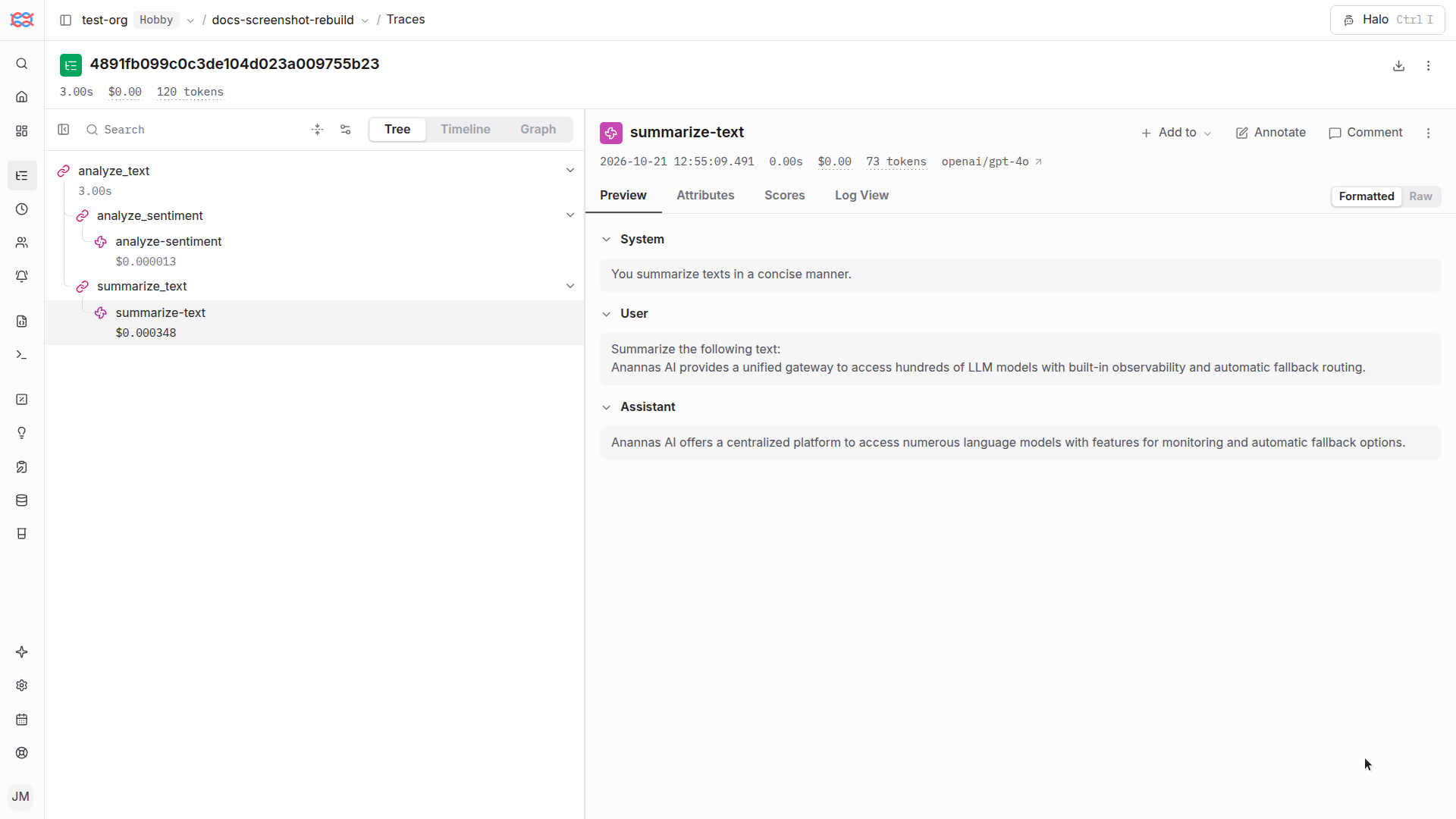
Example trace showing nested LLM calls through Anannas AI gateway in Langfuse
Interoperability with the Python SDK
You can use this integration together with the Langfuse SDKs to add additional attributes to the observation.
The @observe() decorator provides a convenient way to automatically wrap your instrumented code and add additional attributes to the observation.
from langfuse import observe, propagate_attributes, get_client

langfuse = get_client()

@observe()
def my_llm_pipeline(input):
    # Add additional attributes (user_id, session_id, metadata, version, tags) to all spans created within this execution scope
    with propagate_attributes(
        user_id="user_123",
        session_id="session_abc",
        tags=["agent", "my-observation"],
        metadata={"email": "user@langfuse.com"},
        version="1.0.0"
    ):

        # YOUR APPLICATION CODE HERE
        result = call_llm(input)

        return result

# Run the function
my_llm_pipeline("Hi")
Learn more about using the Decorator in the Langfuse SDK instrumentation docs.
The Context Manager allows you to wrap your instrumented code using context managers (with with statements), which allows you to add additional attributes to the observation.
from langfuse import get_client, propagate_attributes

langfuse = get_client()

with langfuse.start_as_current_observation(
    as_type="span",
    name="my-observation",
    trace_context={"trace_id": "abcdef1234567890abcdef1234567890"},  # Must be 32 hex chars
) as observation:

    # Add additional attributes (user_id, session_id, metadata, version, tags)
    # to all observations created within this execution scope
    with propagate_attributes(
        user_id="user_123",
        session_id="session_abc",
        metadata={"experiment": "variant_a", "env": "prod"},
        version="1.0",
    ):
        # YOUR APPLICATION CODE HERE
        result = call_llm("some input")

# Flush events in short-lived applications
langfuse.flush()
Learn more about using the Context Manager in the Langfuse SDK instrumentation docs.
Troubleshooting
Next Steps
Once you have instrumented your code, you can manage, evaluate and debug your application:
Manage prompts in Langfuse Add evaluation scores Run LLM-as-a-judge Evaluators Create datasets Create custom dashboards Test queries in the Playground