本页还没有译文
本页 79 段还没译成Español,下面显示的是英文原文。Tutorial 06 - Beads
还没翻译译自英文(docs.gascity.com)本页 79 段都还没译
Every trackable thing in Gas City is a bead — a unit of work in the store. Sessions, mail, and convoys are beads; a formula (a reusable method) isn't a bead, but running one materializes its steps as beads. You've been creating beads all along: starting a session, sending mail, cooking a formula, slinging work. This tutorial shows what's underneath. See the six primitives for how Bead relates to Agent, Formula, Rig, Pack, and Event.
This page continues from a my-city with my-project rigged, the pancakes
formula cooked, and mayor / reviewer / worker agents (see
Tutorial 05). Everything below runs against the bead
store with the bd tool.
Confirm the local pack, rig registration, and reviewer binding carried forward from the earlier tutorials:
~/my-city
$ cat pack.toml
[pack]
name = "my-city"
schema = 2

[[named_session]]
template = "mayor"
mode = "always"

~/my-city
$ cat city.toml
[workspace]
provider = "claude"

... # content elided

[[rigs]]
name = "my-project"

~/my-city
$ cat agents/reviewer/agent.toml
dir = "my-project"
provider = "codex"
What is a bead
A bead is a unit of work with an ID, a title, a status, and a type. We use the
bd tool to work with beads directly.
~/my-city
$ bd list
○ mc-0ez P2 Mix wet ingredients
○ mc-265 P2 Combine wet and dry
○ mc-79s P2 pancakes
○ mc-9vb P2 Finalize workflow
○ mc-a4l P2 Refactor auth module
○ mc-b8g P2 Mix dry ingredients
○ mc-d4g P2 Sprint 42
○ mc-io4 P2 mayor
○ mc-k3q P2 Serve
○ mc-nia P2 Cook the pancakes
○ mc-xp7 P2 Update API docs

--------------------------------------------------------------------------------
Total: 11 issues (11 open, 0 in progress)

Status: ○ open  ◐ in_progress  ● blocked  ✓ closed  ❄ deferred
The seven pancakes beads come from cooking the formula in
Tutorial 05: a root bead (mc-79s), one bead per
step, and the Finalize workflow control step the v2 compiler appends. Each is
an independent top-level bead with its own ID; ordering lives in dependency
edges (below). The leading glyph is status, followed by ID, priority (P2),
and title. Pass --flat for a single-level list, --all to include closed
beads. Your inventory will differ — Refactor auth module, Sprint 42, and
Update API docs are created later on this page. The shape is what matters.
Every bead has:
- ID — prefixed with two letters from the city or rig name (
mc-194for "my-city",ma-12for a rig "my-app") - Title — human-readable name
- Status —
open,in_progress,blocked,deferred, orclosed - Type — what kind of bead it is
Bead types
The type determines what a bead represents:
| Type | What it is | Created by |
|---|---|---|
| task | A unit of work — including formula steps and workflow roots | bd create, gc formula cook, gc sling |
| message | Inter-agent mail | gc mail send |
| session | A running agent session | gc session new |
| convoy | Container grouping related beads | gc convoy create, auto-created by sling |
There's no separate storage for tasks vs. messages vs. sessions — one store, one query interface, one dependency model for everything. That's what makes the system composable.
A formula has no type of its own. Cooking or slinging one produces plain task
beads: the root carries gc.kind=workflow metadata, and an ephemeral
root-only run carries gc.kind=wisp. The kind lives in metadata, not the type
column. (The v1 materialization wrapped a run in a dedicated molecule
container bead with parent-child step children; the current one uses plain
task beads plus gc.kind metadata.)
Creating beads
Most beads are created indirectly:
gc session new my-project/reviewercreates a session beadgc mail send mayor "Subject" "Body"creates a message beadgc formula cook reviewcreates a workflow root plus a bead for every stepgc sling mayor review --formuladoes the same and routes the work tomayor
But you can use bd to create them manually:
~/my-city
$ bd create "Fix the login bug"
✓ Created issue: mc-ykp — Fix the login bug
  Priority: P2
  Status: open

$ bd create "Refactor auth module" --type feature
✓ Created issue: mc-a4l — Refactor auth module
  Priority: P2
  Status: open

$ bd create "Update API docs"
✓ Created issue: mc-xp7 — Update API docs
  Priority: P2
  Status: open
The trailing lines (Priority:, Status:) vary by bd version — some builds
print one, some both. The bead is created identically either way. The
dependency and convoy examples below use all three of these beads.
Bead lifecycle
Beads flow open → in_progress → closed:
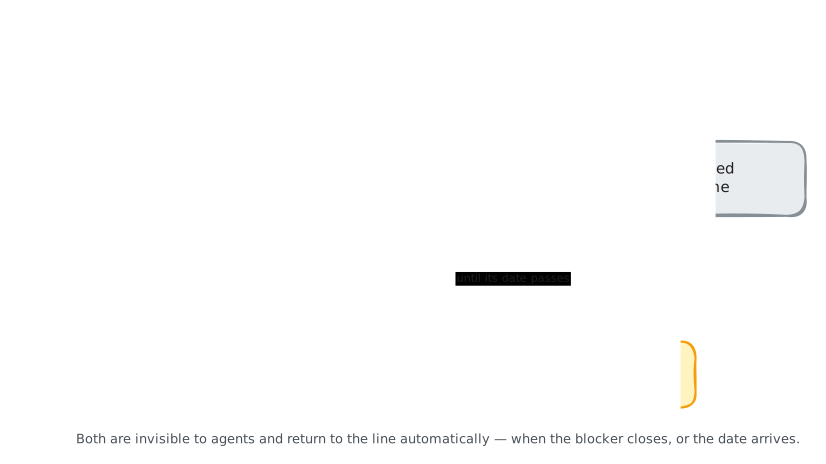
- open — not started; discoverable by agents via hooks.
- in_progress — claimed by an agent.
- closed — done.
- blocked — has an open
blocksdependency. Set automatically. - deferred — snoozed until a date.
You reach for open / in_progress / closed day to day; blocked and
deferred are derived states the system manages for you.
~/my-city
$ bd close mc-ykp
✓ Closed mc-ykp — Fix the login bug: Closed

$ bd list --status open --flat
○ mc-a4l [P2] [feature] - Refactor auth module
○ mc-xp7 [P2] [task]    - Update API docs
Note that the flag is --status (--state is a different command for state
dimensions). As with the opening listing, the output here is trimmed to the
beads this page created — yours will still include the open pancakes beads
and the mayor's session bead.
Beads as execution state
The bead store is the execution state of the whole system — every running session, message in flight, and formula step is a bead with a status. To know what the city is doing right now, query the store:
~/my-city
$ bd list --status in_progress --flat
◐ mc-io4 [P2] [session] - mayor
Because work lives in the store rather than in memory, agent sessions are disposable. If an agent dies its beads stay open; when it restarts, its hooks rediscover the same work. The store is ground truth across crashes and full restarts.
The rest of this chapter covers how beads get organized, routed, grouped, and discovered.
Labels
Labels are how beads get organized and routed:
~/my-city
$ bd label add mc-a4l priority:high
✓ Added label 'priority:high' to mc-a4l

$ bd label add mc-a4l frontend
✓ Added label 'frontend' to mc-a4l

$ bd list --label priority:high --flat
○ mc-a4l [P2] [feature] - Refactor auth module
bd label add takes a single label per call — apply multiples one at a time.
Some labels have special meaning in Gas City:
gc:session— marks session beadsgc:message— marks mail beadsthread:<id>— groups mail messages into conversationsread— marks a message as read
You can add any labels you want for your own organization.
Metadata
Beads carry arbitrary key-value metadata for structured state:
~/my-city
$ bd update mc-a4l --set-metadata branch=feature/auth --set-metadata reviewer=sky
✓ Updated issue: mc-a4l — Refactor auth module
Internally, metadata drives session tracking (session_name, alias), routing
(gc.routed_to), merge strategies, and formula references. Attach anything you
like without touching the title or description; --unset-metadata <key> removes
one.
Dependencies
Beads depend on other beads. You saw this in formulas — needs = ["design"] is
a blocking dependency, so the step can't start until the design bead closes.
This is how Gas City orders work without a central scheduler: each bead knows
what it waits for, and agents see only ready work.
~/my-city
$ bd dep mc-a4l --blocks mc-xp7
✓ Added dependency: mc-a4l (Refactor auth module) blocks mc-xp7 (Update API docs)
Now mc-xp7 won't appear in any agent's work query until mc-a4l is closed —
the same mechanism behind formula step ordering, where needs declarations
become blocks edges.
The dependency types:
| Edge | Means |
|---|---|
blocks | must close before the other can start |
tracks | informational — "I care about this" |
related | loose association |
parent-child | containment (via parent_id) |
discovered-from | work surfaced while doing other work |
Only blocks affects work visibility — it expresses ordering ("do A before
B"). The rest express grouping ("these beads belong together"): v2 workflow
steps tracks their root, convoys tracks their members, and v1 molecules use
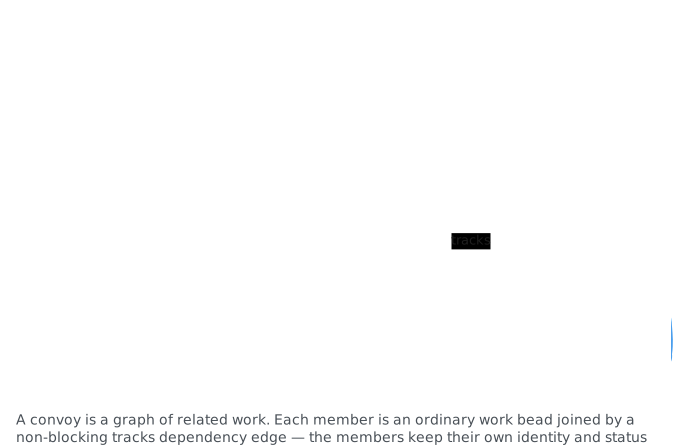
parent-child. A convoy's members don't depend on each other; they're just the
same batch.
Convoys
Slinging an existing bead wraps it in a convoy automatically. Convoys answer
batch questions — "are all five of these tasks done yet?" — and show up in
bd list as type convoy and in gc convoy list with progress summaries.
You can also create one by hand to group arbitrary work as a sprint or deploy:
~/my-city
$ gc convoy create "Sprint 42" mc-ykp mc-a4l mc-xp7
Created convoy mc-d4g "Sprint 42" tracking 3 issue(s)
The convoy is a convoy bead; membership is tracks edges from it to each
member — the "tracking 3 issue(s)" above. Tracking is pure grouping: it changes
no parent and blocks nothing.
~/my-city
$ gc convoy status mc-d4g
Convoy:   mc-d4g
Title:    Sprint 42
Status:   open
Progress: 1/3 closed

ID      TITLE                 STATUS  ASSIGNEE
mc-ykp  Fix the login bug     closed  -
mc-a4l  Refactor auth module  open    -
mc-xp7  Update API docs       open    -
Auto-close
When a bead closes, any convoy tracking it whose members are now all closed
closes itself — in the background via the on_close hook, no polling.
Convoys with the owned label skip auto-close, for workflows where you want explicit control over completion:
~/my-city
$ gc convoy create "Auth rewrite" --owned --target integration/auth
Created convoy mc-0ud "Auth rewrite"
When you're done, land it explicitly:
~/my-city
$ gc convoy land mc-0ud
Landed convoy mc-0ud "Auth rewrite"
Adding beads and checking convoys
Work grows after a convoy is created — a bug surfaces mid-sprint. Add beads to an existing convoy:
~/my-city
$ gc convoy add mc-d4g mc-xp7
Added mc-xp7 to convoy mc-d4g
If a convoy should have auto-closed but didn't (a hook misfired), reconcile manually:
~/my-city
$ gc convoy check
Auto-closed convoy mc-d4g "Sprint 42"
1 convoy(s) auto-closed
Stranded work
To find open beads in convoys that have no assignee — work that's stuck waiting for someone to pick it up:
~/my-city
$ gc convoy stranded
CONVOY  ISSUE   TITLE
mc-d4g  mc-a4l  Refactor auth module
mc-d4g  mc-xp7  Update API docs
Convoy metadata
Convoys carry metadata that controls how grouped work behaves:
convoy.owner— which agent manages this convoyconvoy.notify— who to notify when the convoy completesconvoy.merge— merge strategy for PRs (direct,mr,local)target— target branch inherited by child beads
These are set at creation time with flags:
~/my-city
$ gc convoy create "Deploy v2" --owner mayor --merge mr --target main
Created convoy mc-zk1 "Deploy v2"
Or update the target later:
~/my-city
$ gc convoy target mc-zk1 develop
Set target of convoy mc-zk1 to develop
How agents find work
Routed agents discover work through the claim protocol in their session startup
prompt, which runs gc hook --claim. (The legacy Stop-hook form gc hook --inject is silent compatibility behavior and no longer injects work.) The
flow:
- Work is created (
bd create,gc sling, formula cook, …) - Work is routed to an agent (assignee or
gc.routed_tometadata) - Session startup runs the agent's work query through
gc hook --claim - The hook atomically claims one ready bead and preassigns continuation siblings
- The agent runs the claimed work — find work on your hook, you run it
For work routed to a pool — a group of agents sharing a work queue, which Tutorial 07 covers — the query checks metadata instead of assignee:
~/my-city
$ bd ready --metadata-field gc.routed_to=my-project/worker --unassigned --limit=1
mc-xp7 is blocked by mc-a4l, so this query won't return it — blocked work
is invisible to work queries. Once mc-a4l closes, rerun the same query. The
readiness barrier is gone, though mc-xp7 would also need
gc.routed_to=my-project/worker to land in this queue, which nothing here
sets. Routing decides which queue a bead appears in; readiness decides
whether it appears at all.
This is the "pull" model: agents check for work instead of having it pushed.
The bead store
Beads are persisted in a store. Gas City supports several backends:
- bd (default) — Dolt-backed database via the
bdCLI. Full-featured, good for production. - file — JSON file on disk. Simple, good for tutorials and small setups.
- exec — Delegates to a custom script. For integration with external systems.
Configure the backend in city.toml:
[beads]
provider = "file"    # or "bd" (default)
For most users, the default works fine and you don't need to think about it.
You rarely touch beads directly — gc session, gc mail, gc sling, and gc formula handle creation and management. You reach for bd when you want to
query outstanding work across the city, create ad-hoc tasks, inspect a
formula's dependency graph, or debug why an agent isn't picking up work.
(Listings trimmed to this page's beads; open pancakes beads will show up in
yours too.)
~/my-city
$ bd list --status open --type task --flat
○ mc-xp7 [P2] [task] - Update API docs
○ mc-b8g [P2] [task] - Mix dry ingredients (blocks: mc-265)

$ bd show mc-a4l
○ mc-a4l · Refactor auth module   [P2 · OPEN]
Owner: dbox · Type: feature
Created: 2026-04-08 · Updated: 2026-04-08

LABELS: frontend, priority:high

METADATA
  branch: feature/auth
  reviewer: sky

BLOCKS
  ← ○ mc-xp7: Update API docs P2
  ← ○ mc-d4g: Sprint 42 P2

$ bd close mc-a4l
✓ Closed mc-a4l — Refactor auth module: Closed
The Sprint 42 entry under BLOCKS is the convoy's incoming tracks edge —
grouping, not a blocker.
Beads are the ground truth of the city's running state. Sessions, mail, and convoys are beads; a formula materializes its work as beads when run.
What's next
- Orders — formulas and scripts on autopilot, triggered by time, schedule, conditions, or events