本页还没有译文
本页 41 段还没译成Español,下面显示的是英文原文。Set Up a Multi-Agent Engineering Environment
还没翻译译自英文(docs.gascity.com)本页 41 段都还没译
This guide is for teams already doing some version of multi-agent engineering by hand: humans coordinating branches in chat, several AI sessions working in parallel, docs and migration notes and issue threads all moving at once, one person watching release shape, another carrying operational truth, another driving the bits into existence.
Gas City does not ask you to invent a new kind of work. It takes the coordination you do by hand — deciding what is ready, fanning tasks out to several agents at once, waiting on dependencies, retrying failures — and lets an orchestrator run it for you. You write the method down once as a formula; the orchestrator drives it to completion across many agents, outside any single session.
The hand-rolled system has predictable friction
Most multi-agent teams improvise a system that looks like this: a shared repo with multiple worktrees, one or more coordinator humans keeping the branch story straight, specialist agents doing bounded tasks in parallel, and prompts, scripts, notes, and checklists scattered between files and chat. It works — and it leaks:
| Where work lives now | The cost |
|---|---|
| Important context in chat | Lost when the thread scrolls away |
| Role behavior as loose prompts | Hard to version cleanly |
| Branch and environment setup | Repeated by hand every time |
| Operational truth in tutorials, notes, and heads | Drifts from what the tooling knows |
Gas City makes those moving parts first-class pack and city content, and puts an orchestrator behind them — so coordination no longer lives in one person's head and chat window.
The primitives let an orchestrator run your team's work
New to the core vocabulary? Read the six primitives first — Agent, Bead, Formula, Rig, Pack, and Event are the model everything below configures.
- Formulas (HOW the work gets done) become methods the orchestrator compiles into a graph of beads and drives to completion — decomposing a job, fanning ready steps out to many agents at once, gating each step on its dependencies, retrying failures. Orders (WHEN) trigger those formulas on a schedule or event.
- Agents (WHO does the work) become explicit directories with prompt and local assets.
- A pack (what CONFIGURES the above) declares those agents, formulas, and orders. The City is the local root pack; it imports shared packs.
Around the primitives, the supporting config gets a home too: commands,
doctor checks, and template fragments stop being loose files, and
.gc/ becomes the machine-local site-binding and runtime layer. The working
style becomes orchestrator-driven instead of hand-driven, and the method itself
becomes reproducible, legible, shareable, and version-controlled.
Everything sorts into three layers
The City is the local root pack; it imports shared packs. A pack and a city are the same kind of container at different scopes. Each piece of your workflow belongs to exactly one of three layers:
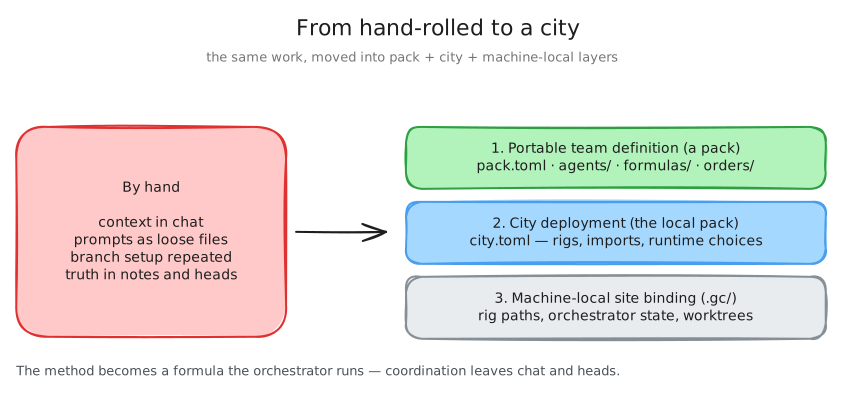
| Layer | What it holds | Where it lives |
|---|---|---|
| 1. Portable team definition (a pack) | Pack identity, agent defaults, imported packs, prompts, overlays, helper scripts, commands, doctor checks, formulas, and orders | pack.toml and pack-owned dirs: agents/, commands/, doctor/, formulas/, orders/, template-fragments/, overlay/, assets/ |
| 2. City deployment choices (the local pack) | Which rigs exist, which shared packs import into the city or specific rigs, runtime and substrate choices, deployment policy | city.toml |
| 3. Machine-local site binding and runtime state | Local rig bindings, orchestrator state, caches, worktrees, sockets, logs, generated state | .gc/ and other runtime directories |
Formulas and orders live in layer 1 because they are portable method: a formula compiles to a graph the orchestrator runs across many agents; an order triggers it on a schedule or event. Layer 3 is the stuff that must never be mistaken for portable definition.
A useful first city is small
You do not need a perfect city on day one. A good first version:
- one root city pack
- a small set of named agents for the human and agent roles you already have
- one or two commands that encode common team operations
- one migration guide or working note you actively use
- a habit of running the real work through the city instead of beside it
That is enough to start learning.
Real roles get real places to live
Imagine a release-wave team with three humans and several agents. The humans divide into an operational/tutorial owner, a product/engineering connector, and an implementation-heavy technical lead. The agents divide into audit/review, migration, release-shape validation, docs-truth/schema alignment, and targeted implementation workers.
| Role surface | Lives in |
|---|---|
| Human-facing operations | commands/ |
| Known-mistake checks | doctor/ |
| Reusable prompt language | template-fragments/ |
| Per-agent prompt and overlay state | agents/<name>/ |
The point is not to freeze your team shape forever. It is to stop pretending a real multi-agent workflow is just "some prompts somewhere" plus shell history. The method that coordinates the agents becomes a formula the orchestrator executes for you, not a routine you perform by hand every time.
Move the parts you already repeat
| Good candidates | Less urgent |
|---|---|
| Stable role prompts | Every experimental prompt variation |
| Shared operating language | Every temporary branch-specific hack |
| Repeated review or migration commands | Org-wide policy before the local model works |
| Checks for known structural mistakes | |
| Common overlays, helper scripts, formulas | |
| Release-wave coordination patterns |
Start with the parts you are already repeating.
Turn repeated operations into pack commands
A pack command is a directory under commands/ holding a command.toml
(its description and help) plus a script the orchestrator runs. The command
surfaces as a top-level gc subcommand named after the directory:
# commands/release-branches/command.toml
description = "Show me the active release branches"
# commands/release-branches/run.sh — runs as: gc release-branches
set -e
git for-each-ref --sort=-committerdate \
--format='%(refname:short)' 'refs/remotes/origin/release/*'Other easy wins: "run the focused migration checks", "summarize open release issues", "prepare the branch for review". The win is not just automation — it is that your working method becomes visible and versioned, even when the implementation is just shell at first.
Encode known mistakes as doctor checks
If your team keeps rediscovering the same mistakes — stale file naming
after a migration, a required prompt file missing from an agent directory,
contradictory config across pack and city layers, known release-shape
mismatches — encode them. A doctor check is a directory under doctor/
with a doctor.toml description and a run.sh that exits non-zero on
failure; gc doctor runs every check the city's packs supply:
# doctor/check-agent-prompts/doctor.toml
description = "Every agent directory has a prompt.md"
# doctor/check-agent-prompts/run.sh
set -e
for dir in agents/*/; do
test -f "$dir/prompt.md" || {
echo "missing prompt.md in $dir" >&2
exit 1
}
done$ gc doctor
✓ check-agent-prompts Every agent directory has a prompt.mdA doctor check is a better long-term home than a Slack message or a buried release note.
Dogfooding is your highest-signal feedback loop
If your team is building Gas City, using Gas City to do that work surfaces problems nothing else will: awkward workflow you feel, docs that lie, migration paths that turn out shaky. Not every hour must run through the city — but when you want meaningful product signal, use a branch you are actually trying to trust, not a throwaway sandbox.
Adopt by writing down what you already do
You do not need to start from scratch:
- write down the working style you already have
- identify the parts you keep doing by hand
- move the repeated parts into pack-owned content
- give the team a city that reflects how you actually work
- let the friction teach you what to improve next
This beats trying to design the perfect multi-agent city in one shot.