本页还没有译文
本页 40 段还没译成日本語,下面显示的是英文原文。Monitor Cerebras with Langfuse
还没翻译译自英文(langfuse.com)本页 40 段都还没译
Observability for Cerebras with Langfuse
This guide shows you how to integrate Cerebras with Langfuse. Cerebras's API is fully compatible with OpenAI's client libraries, allowing us to use the Langfuse OpenAI drop-in replacement to trace all parts of your application.
What is Cerebras? Cerebras is a high-throughput, low-latency inference platform built on Cerebras’ wafer-scale processors (WSE) and CS systems, optimized specifically for token generation at scale.
What is Langfuse? Langfuse is an open source AI engineering platform that helps teams trace API calls, monitor performance, and debug issues in their LLM applications. Use Langfuse Cloud (hosted by Langfuse, free tier, no infrastructure to run) or self-host it.
Step 1: Install Dependencies
Make sure you have installed the necessary Python packages:
%pip install openai langfuse -qStep 2: Set Up Environment Variables
import os

# Get keys for your project from the project settings page: https://cloud.langfuse.com
os.environ.setdefault("LANGFUSE_PUBLIC_KEY", "pk-lf-...");
os.environ.setdefault("LANGFUSE_SECRET_KEY", "sk-lf-...");
os.environ.setdefault("LANGFUSE_BASE_URL", "https://cloud.langfuse.com"); # 🇪🇺 EU region
# Other Langfuse data regions include 🇺🇸 US: https://us.cloud.langfuse.com, 🇯🇵 Japan: https://jp.cloud.langfuse.com and ⚕️ HIPAA: https://hipaa.cloud.langfuse.com

# Get your Cerebras API key from https://cloud.cerebras.ai/
os.environ.setdefault("CEREBRAS_API_KEY", "csk-...");
Step 3: Langfuse OpenAI drop-in Replacement
In this step we use the native OpenAI drop-in replacement by importing from langfuse.openai import openai.
To start using Cerebras with OpenAI's client libraries, pass in your Cerebras API key to the api_key option, and change the base_url to https://api.cerebras.ai/v1:
# instead of import openai:
from langfuse.openai import openai

client = openai.OpenAI(
  api_key=os.environ.get("CEREBRAS_API_KEY"),
  base_url="https://api.cerebras.ai/v1",
)
Step 4: Run An Example
The following cell demonstrates how to call Cerebras's chat model using the traced OpenAI client. All API calls will be automatically traced by Langfuse.
response = client.chat.completions.create(
  model="zai-glm-4.6",
  messages=[
    {"role": "system", "content": "You are a travel agent. Be descriptive and helpful."},
    {"role": "user", "content": "Tell me the top 3 things to do in San Francisco"},
  ],
  name="cerebras-travel-agent"
)

print(response.choices[0].message.content)
Step 5: See Traces in Langfuse
After running the example model call, you can see the traces in Langfuse. You will see detailed information about your Cerebras API calls, including:
- Request parameters (model, messages, temperature, etc.)
- Response content
- Token usage statistics
- Latency metrics
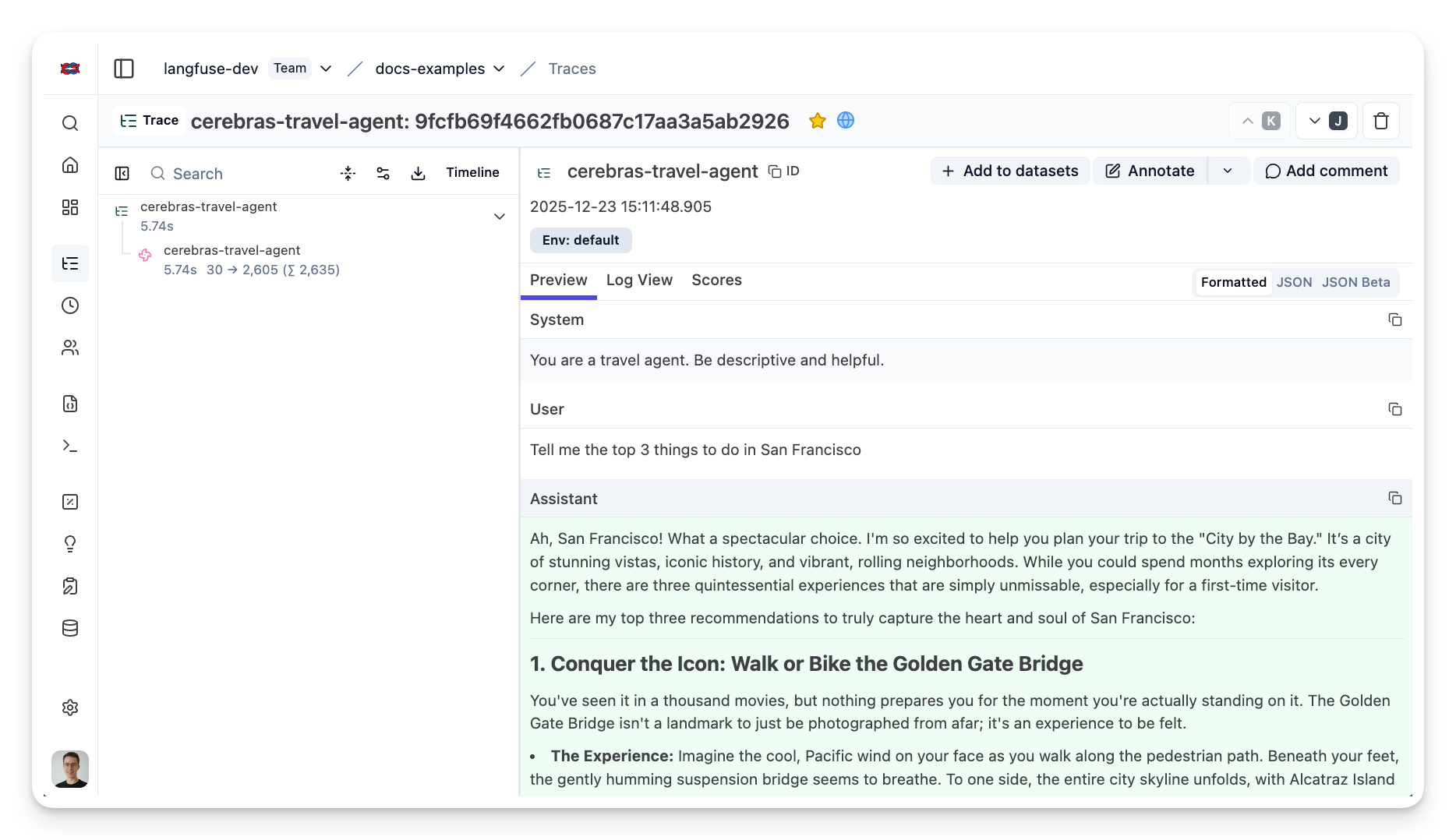
Public example trace link in Langfuse
Interoperability with the Python SDK
You can use this integration together with the Langfuse SDKs to add additional attributes to the observation.
The @observe() decorator provides a convenient way to automatically wrap your instrumented code and add additional attributes to the observation.
from langfuse import observe, propagate_attributes, get_client

langfuse = get_client()

@observe()
def my_llm_pipeline(input):
    # Add additional attributes (user_id, session_id, metadata, version, tags) to all spans created within this execution scope
    with propagate_attributes(
        user_id="user_123",
        session_id="session_abc",
        tags=["agent", "my-observation"],
        metadata={"email": "user@langfuse.com"},
        version="1.0.0"
    ):

        # YOUR APPLICATION CODE HERE
        result = call_llm(input)

        return result

# Run the function
my_llm_pipeline("Hi")
Learn more about using the Decorator in the Langfuse SDK instrumentation docs.
The Context Manager allows you to wrap your instrumented code using context managers (with with statements), which allows you to add additional attributes to the observation.
from langfuse import get_client, propagate_attributes

langfuse = get_client()

with langfuse.start_as_current_observation(
    as_type="span",
    name="my-observation",
    trace_context={"trace_id": "abcdef1234567890abcdef1234567890"},  # Must be 32 hex chars
) as observation:

    # Add additional attributes (user_id, session_id, metadata, version, tags)
    # to all observations created within this execution scope
    with propagate_attributes(
        user_id="user_123",
        session_id="session_abc",
        metadata={"experiment": "variant_a", "env": "prod"},
        version="1.0",
    ):
        # YOUR APPLICATION CODE HERE
        result = call_llm("some input")

# Flush events in short-lived applications
langfuse.flush()
Learn more about using the Context Manager in the Langfuse SDK instrumentation docs.
Troubleshooting
Next Steps
Once you have instrumented your code, you can manage, evaluate and debug your application:
Manage prompts in Langfuse Add evaluation scores Run LLM-as-a-judge Evaluators Create datasets Create custom dashboards Test queries in the Playground