本页还没有译文
本页 42 段还没译成한국어,下面显示的是英文原文。Trace the Microsoft Agent Framework with Langfuse
还没翻译译自英文(langfuse.com)本页 42 段都还没译
This notebook demonstrates how to integrate Langfuse into your Microsoft Agent Framework workflow to monitor, debug and evaluate your AI agents.
What is the Microsoft Agent Framework?: The Microsoft Agent Framework is an open-source framework for building intelligent agents. It provides a comprehensive set of tools for creating agents that can interact with various services, execute tasks, and handle complex workflows. The framework supports multiple LLM providers including Azure OpenAI and OpenAI, and offers built-in observability through OpenTelemetry.
What is Langfuse?: Langfuse is an open-source observability platform for AI agents. It helps you visualize and monitor LLM calls, tool usage, cost, latency, and more. Use Langfuse Cloud (hosted by Langfuse, free tier, no infrastructure to run) or self-host it.
1. Install Dependencies
Below we install the agent-framework library (the Microsoft Agent Framework) and langfuse for observability.
%pip install agent-framework langfuse --pre2. Configure Environment & Langfuse Credentials
Next, set up your Langfuse API keys. You can get these keys by signing up for a free Langfuse Cloud account or by self-hosting Langfuse. These environment variables are essential for the Langfuse client to authenticate and send data to your Langfuse project.
import os

# Get keys for your project from the project settings page: https://cloud.langfuse.com
os.environ.setdefault("LANGFUSE_PUBLIC_KEY", "pk-lf-...");
os.environ.setdefault("LANGFUSE_SECRET_KEY", "sk-lf-...");
os.environ.setdefault("LANGFUSE_BASE_URL", "https://cloud.langfuse.com"); # 🇪🇺 EU region
# Other Langfuse data regions include 🇺🇸 US: https://us.cloud.langfuse.com, 🇯🇵 Japan: https://jp.cloud.langfuse.com and ⚕️ HIPAA: https://hipaa.cloud.langfuse.com

# Your Azure OpenAI credentials
os.environ.setdefault("AZURE_OPENAI_API_KEY", "your-azure-openai-key");
os.environ.setdefault("AZURE_OPENAI_ENDPOINT", "https://your-resource.openai.azure.com/");
os.environ.setdefault("AZURE_OPENAI_CHAT_DEPLOYMENT_NAME", "gpt-5-mini");
os.environ.setdefault("OPENAI_CHAT_MODEL_ID", "gpt-5-mini");
3. Initialize Langfuse Client
Initialize the Langfuse client to verify the connection. get_client() initializes the Langfuse client using the credentials provided in the environment variables.
from langfuse import get_client

langfuse = get_client()

# Verify connection
if langfuse.auth_check():
    print("Langfuse client is authenticated and ready!")
else:
    print("Authentication failed. Please check your credentials and host.")
4. Enable Observability
The Microsoft Agent Framework includes built-in observability support through OpenTelemetry. Enable it by calling configure_otel_providers() which automatically exports traces to Langfuse.
Note
Note: Set enable_sensitive_data=True to capture full request/response data including function arguments and results.
from agent_framework.observability import configure_otel_providers

configure_otel_providers(enable_sensitive_data=True)
5. Hello World Example with Tool
Below we create a weather agent using the Microsoft Agent Framework with Azure OpenAI. The agent has access to a get_weather function tool that it can call to retrieve weather information.
import asyncio
from random import randint
from typing import Annotated
from agent_framework.azure import AzureOpenAIChatClient
from pydantic import Field

def get_weather(
    location: Annotated[str, Field(description="The location to get the weather for.")],
) -> str:
    """Get the weather for a given location."""
    conditions = ["sunny", "cloudy", "rainy", "stormy"]
    return f"The weather in {location} is {conditions[randint(0, 3)]} with a high of {randint(10, 30)}°C."

async def main():
    # Create an agent with Azure OpenAI
    async with AzureOpenAIChatClient().create_agent(
        instructions="You are a helpful weather agent.",
        tools=get_weather,
    ) as agent:
        query = "What's the weather like in Seattle?"
        print(f"User: {query}")
        result = await agent.run(query)
        print(f"Agent: {result}\n")

# Run the agent
await main()
6. Using OpenAI Directly
The Microsoft Agent Framework also supports using OpenAI directly (not through Azure). Simply use OpenAIResponsesClient instead of AzureOpenAIChatClient.
# Required for OpenAI API access
os.environ.setdefault("OPENAI_API_KEY", "sk-proj-...");
os.environ.setdefault("OPENAI_RESPONSES_MODEL_ID", "gpt-5-mini");
from agent_framework.openai import OpenAIResponsesClient
from typing import Annotated
from pydantic import Field
from random import randint
def get_weather(
location: Annotated[str, Field(description="The location to get the weather for.")],
) -> str:
"""Get the weather for a given location."""
conditions = ["sunny", "cloudy", "rainy", "stormy"]
return f"The weather in {location} is {conditions[randint(0, 3)]} with a high of {randint(10, 30)}°C."
async def main():
async with OpenAIResponsesClient().create_agent(
instructions="You are a helpful assistant.",
tools=get_weather,
) as agent:
query = "What's the weather in Tokyo?"
print(f"User: {query}")
result = await agent.run(query)
print(f"Agent: {result}\n")
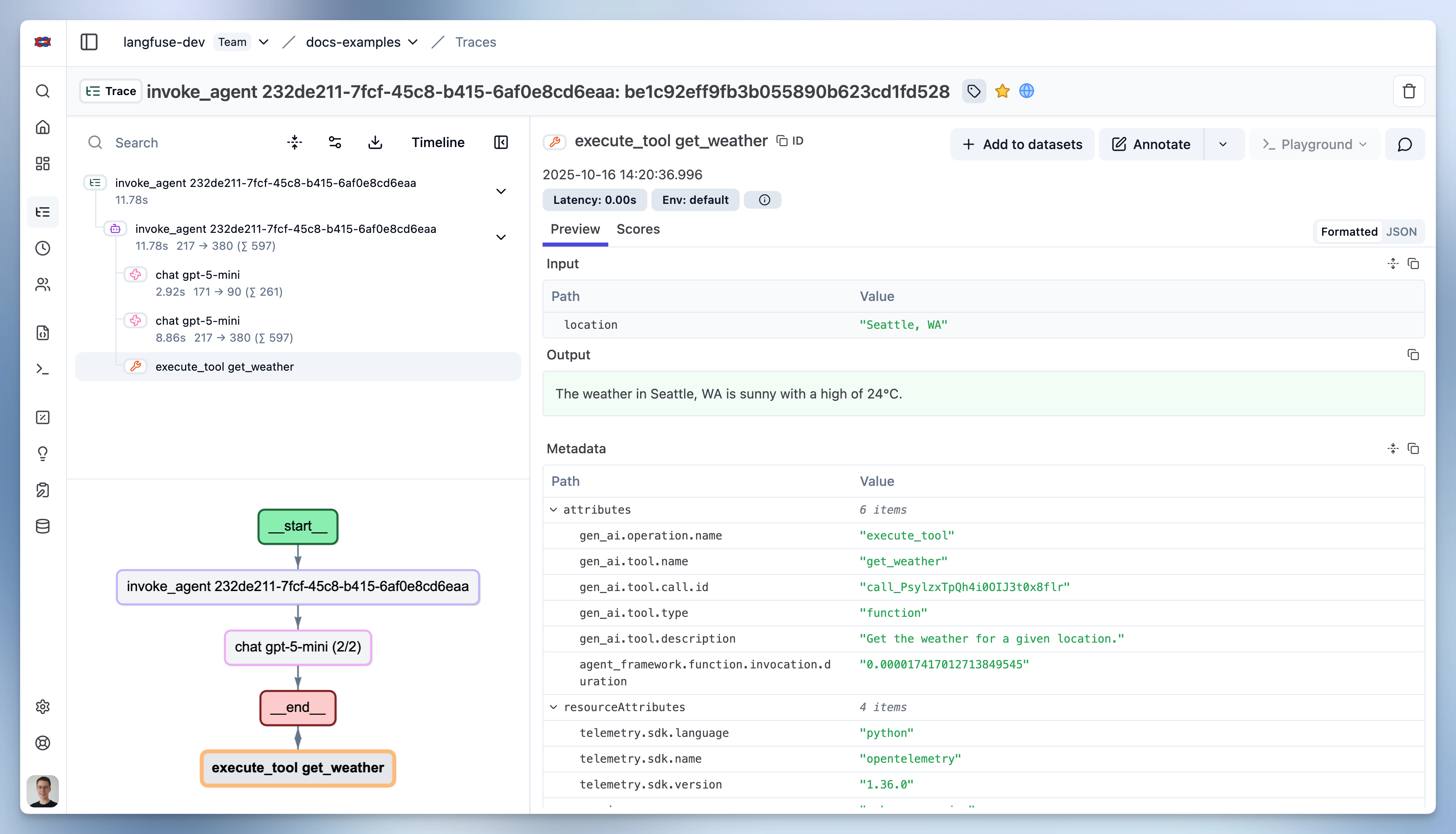
await main()7. See Traces in Langfuse
Interoperability with the Python SDK
You can use this integration together with the Langfuse SDKs to add additional attributes to the observation.
The @observe() decorator provides a convenient way to automatically wrap your instrumented code and add additional attributes to the observation.
from langfuse import observe, propagate_attributes, get_client

langfuse = get_client()

@observe()
def my_llm_pipeline(input):
    # Add additional attributes (user_id, session_id, metadata, version, tags) to all spans created within this execution scope
    with propagate_attributes(
        user_id="user_123",
        session_id="session_abc",
        tags=["agent", "my-observation"],
        metadata={"email": "user@langfuse.com"},
        version="1.0.0"
    ):

        # YOUR APPLICATION CODE HERE
        result = call_llm(input)

        return result

# Run the function
my_llm_pipeline("Hi")
Learn more about using the Decorator in the Langfuse SDK instrumentation docs.
The Context Manager allows you to wrap your instrumented code using context managers (with with statements), which allows you to add additional attributes to the observation.
from langfuse import get_client, propagate_attributes

langfuse = get_client()

with langfuse.start_as_current_observation(
    as_type="span",
    name="my-observation",
    trace_context={"trace_id": "abcdef1234567890abcdef1234567890"},  # Must be 32 hex chars
) as observation:

    # Add additional attributes (user_id, session_id, metadata, version, tags)
    # to all observations created within this execution scope
    with propagate_attributes(
        user_id="user_123",
        session_id="session_abc",
        metadata={"experiment": "variant_a", "env": "prod"},
        version="1.0",
    ):
        # YOUR APPLICATION CODE HERE
        result = call_llm("some input")

# Flush events in short-lived applications
langfuse.flush()
Learn more about using the Context Manager in the Langfuse SDK instrumentation docs.
Troubleshooting
Next Steps
Once you have instrumented your code, you can manage, evaluate and debug your application:
Manage prompts in Langfuse Add evaluation scores Run LLM-as-a-judge Evaluators Create datasets Create custom dashboards Test queries in the Playground