本页还没有译文
本页 37 段还没译成简体中文,下面显示的是英文原文。Tutorial 01 - Cities and Rigs
还没翻译译自英文(docs.gascity.com)本页 37 段都还没译
Setup
Install at least one CLI coding agent (Gas City calls these "providers") and
put it on the PATH. Gas City supports many, including Claude Code (claude),
Codex (codex), Gemini (gemini), Grok Build (grok), OpenCode (opencode),
Groq (groq), and Cerebras (cerebras). Configure each with its token or API
key so it can run — the more the merrier.
Then install the Gas City CLI and put it on the PATH:
~
$ brew install gascity
...

~
$ gc version
1.1.1
NOTE: the gascity installation is a great way to get the right dependencies in place, but may not be enough to keep up with the changes we're making on the way to 1.0. Best practice right now is to build your own
gcbinary from HEAD on themainbranch of the gascity repo to get the latest and greatest bits before running these tutorials.
New to the vocabulary? Read How Gas City Works first — the canonical model for the six primitives (Agent, Bead, Formula, Rig, Pack, Event) this tutorial puts into practice. The city is the local (root) pack; it imports shared packs.
Creating a city
A city is the directory holding the agents, formulas, rigs, orders, and local settings the orchestrator needs to run multi-agent workflows on this machine. Inside it, a pack is the portable part — the definitions worth sharing with other cities. A city is a pack plus deployment details.
Create one with gc init:
~
$ gc init ~/my-city
Welcome to Gas City SDK!

Choose a config template:
  1. gascity   — planning & implementation skills pack (default)
  2. minimal   — default coding agent
  3. gastown   — multi-agent orchestration pack
  4. custom    — empty workspace, configure it yourself
Template [1]:

Choose your coding agent:
  1. Claude Code
  2. Codex
  3. Gemini CLI
If you don't see your coding agent, configure it and restart the wizard.
Agent: 1
[1/8] Creating runtime scaffold
[2/8] Installing hooks (Claude Code)
[3/8] Writing default prompts
[4/8] Writing pack.toml
[5/8] Writing city configuration
Created gascity config (Level 1) in "my-city".
[6/8] Checking provider readiness
[7/8] Registering city with supervisor
Registered city 'my-city' (/Users/csells/my-city)
Installed launchd service: /Users/csells/Library/LaunchAgents/com.gascity.supervisor.plist
[8/8] Waiting for supervisor to start city

~
$ gc cities
NAME     PATH
my-city  /Users/csells/my-city
The agent menu lists only the coding agents the wizard finds configured on your machine — today it can probe Claude Code, Codex, Gemini CLI, and Antigravity. If exactly one is configured, the wizard selects it without asking.
To skip the prompts, supply the provider explicitly:
~
$ gc init ~/my-city --default-provider claude
Gas City created the city directory, registered it, and started it. Look inside:
~
$ cd ~/my-city

~/my-city
$ ls
agents  assets  city.toml  commands  doctor  formulas  orders  overlays  pack.toml  template-fragments
At the top level of the city directory:
pack.toml— the portable pack definition layercity.toml— city-local deployment and runtime settings
This city comes with a city-local mayor agent. The mayor's prompt lives at
agents/mayor/prompt.template.md, and pack.toml defines the always-on mayor
session that uses it. Assuming you chose the default gascity config template
and Claude Code, city.toml keeps the shared runtime settings:
~/my-city
$ cat city.toml
[workspace]
provider = "claude"

[providers]
[providers.claude]              # registers your provider against a builtin preset
base = "builtin:claude"
ready_delay_ms = 0

[daemon]
formula_v2 = true # the v2 formula compiler, on by default (Tutorial 05)~/my-city
$ cat pack.toml
[pack]
name = "my-city"
schema = 2
[imports.core]
source = "https://github.com/gastownhall/gascity.git//internal/bootstrap/packs/core"
version = "sha:<pinned commit>"
[imports.bd]
source = "https://github.com/gastownhall/gascity.git//examples/bd"
version = "sha:<pinned commit>"
[imports.gascity]
source = "https://github.com/gastownhall/gascity-packs/tree/main/gascity"
version = "sha:<pinned commit>"
[[named_session]]
template = "mayor"
mode = "always"The [workspace] section in city.toml sets shared runtime defaults such as
the provider. The [providers.claude] table registers your chosen provider
against the builtin claude preset. The v2 formula compiler is on by default,
so nothing is written for it (you'll meet formulas in
Tutorial 05). The [imports] entries
in pack.toml are explicit pack composition, not hidden load-time behavior.
core and, for cities on the default bd beads provider, bd are bundled
system packs that resolve offline from the user-global pack cache. The
gascity import is the public planning and implementation skills pack pinned
to the registry release embedded with this gc binary. If required builtin
imports go missing, gc doctor --fix restores them. The machine-local
workspace identity lives in .gc/site.toml instead, which is how gc cities, gc status, and other commands still know this city is named
my-city.
The mayor session comes from the scaffolded agents/mayor/ content and the
explicit [[named_session]] entry, so you can talk to it at any time. When
you add more agents later, Gas City creates agents/<name>/, with
prompt.template.md for the prompt and agent.toml for any per-agent
overrides.
Gas City also derives a worker template for each provider declared in
city.toml's [providers] table — so claude is available as a template
name (and, once you add a rig, <rig>/claude) even though it is not a
hardcoded role. Provider-derived workers use the core pack's stock
pool-worker prompt and get mol-do-work as their default sling formula —
more on that in a moment. (The mol- prefix is v1 naming carried by the
formula's name; it doesn't change what the formula is — a reusable method.)
To check on the status of your city, use gc status:
~/my-city
$ gc status
my-city  /Users/csells/my-city
  Controller: supervisor-managed (PID 83621)
  API:        http://127.0.0.1:8372
  Authority: supervisor process PID 83621
  Suspended:  no

Agents:
  bd.dog                  scaled (min=0, max=2)
    bd.dog-1              stopped
    bd.dog-2              stopped
  control-dispatcher      stopped

0/3 agents running

Named sessions:
  mayor                   reserved-unmaterialized (always)
A named session shows reserved-unmaterialized until the orchestrator
materializes it; once the mayor session is up, its state reads awake (or
active — the two are equivalent).
The dolt.dog pool is a background utility agent from the bundled dolt pack
(pulled in transitively through the explicit bd import you saw in
pack.toml — the dolt. prefix is the import binding it arrived through).
It handles Dolt database housekeeping for the beads backend. control-dispatcher is platform
infrastructure: the orchestrator uses it to advance formula workflows. You don't
need to interact with either — ignore them for now.
Adding a rig
Note
If another Gas City workspace is already registered (check gc cities),
commands inside ~/my-city may resolve to that city and fail. Pass --city ~/my-city explicitly when that happens. These examples assume a single
registered city.
In Gas City, a project directory registered with a city is called a "rig." Rigging a project's directory lets agents work in it.
~/my-city
$ gc rig add ~/my-project
Adding rig 'my-project'...
  Prefix: mp
  Initialized beads database
  Generated routes.jsonl for cross-rig routing
Rig added.
Gas City derived the rig name from the directory basename (my-project) and
set up work tracking in it. The portable declaration lands in city.toml; the
path binding stays machine-local in .gc/site.toml:
~/my-city
$ cat city.toml
[workspace]
provider = "claude"

... # content elided

[[rigs]]
name = "my-project"
# .gc/site.toml — machine-local
[[rig]]
name = "my-project"
path = "/Users/csells/my-project"You can also see your city's rigs with gc rig list:
~/my-project
$ gc rig list

Rigs in /Users/csells/my-city:

  my-city (HQ):
    Prefix: mc
    Beads:  initialized

  my-project:
    Path:   /Users/csells/my-project
    Prefix: mp
    Beads:  initialized
Slinging your first work
You assign work to agents by "slinging" it. Target the rig-scoped agent explicitly to keep the work on this rig; hop into the rig directory to inspect the results:
~/my-city
$ cd ~/my-project

~/my-project
$ gc sling my-project/claude "Write hello world in python to the file hello.py"
Created mp-ff9 — "Write hello world in python to the file hello.py"
Attached workflow mp-6yh (formula "mol-do-work") to mp-ff9
One command set the whole loop in motion: sling created a work bead, attached
a workflow from the agent's default formula (mol-do-work — read the bead, do
the work, close it), and the orchestrator spawned a session to run it.
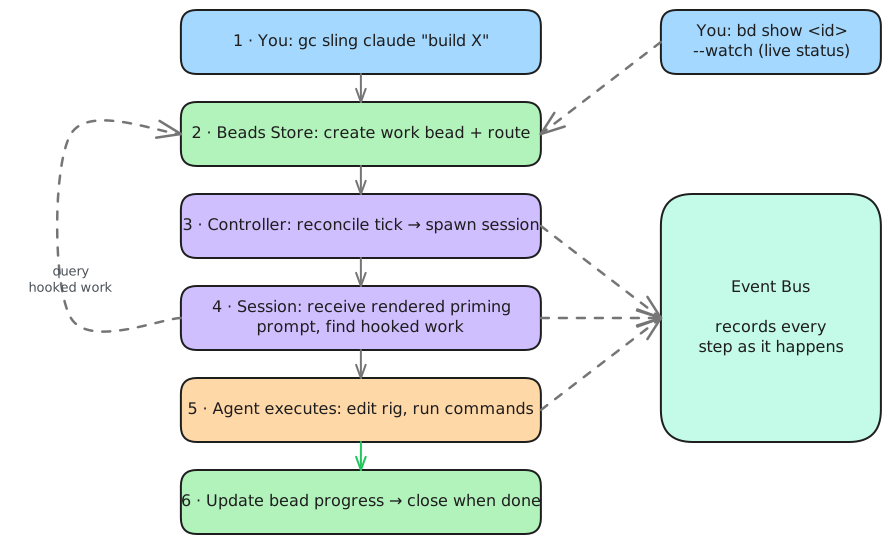
Watch the bead progress with --watch:
~/my-project
$ gc bd show mp-ff9 --watch
○ mp-ff9 · Write hello world in python to the file hello.py   [P2 · OPEN]
Owner: Chris Sells · Type: task
Created: 2026-04-07 · Updated: 2026-04-07

BLOCKS
  ← ○ mp-4tl: input convoy for mp-ff9 P2

Watching for changes... (Press Ctrl+C to exit)
The BLOCKS line is the input convoy sling created to track your bead. When
the agent finishes, the status flips from OPEN to CLOSED — and the file is
there:
~/my-project
$ ls
hello.py
Success! You dispatched work to an AI agent and got results back.
That was the simplest possible job: one agent, one task. The reason Gas City exists is what happens when the job is bigger — you write a formula and the orchestrator runs it as a graph, fanning ready steps out to many agents at once and driving them to completion without you babysitting a session. You'll build one of those in the Formulas tutorial.
What's next
You've created a city, added a project as a rig, and slung work to an agent on that rig. From here:
- Agents — go deeper on agent configuration: prompts, sessions, scope, working directories
- Sessions — interactive conversations with agents, on-demand workers and persistent worker pools
- Formulas — write a method for how a job gets done and let the orchestrator run it as a graph: fan steps out across many agents, gate them on dependencies, retry failures, and drive the job to completion outside your session