本页还没有译文
本页 56 段还没译成简体中文,下面显示的是英文原文。Use JSON from the gc CLI
还没翻译译自英文(docs.gascity.com)本页 56 段都还没译
Gas City's CLI is human-readable by default. When software calls gc — agents,
shell scripts, dashboard tools, smoke tests, CI — pass --json on commands that
support it, so callers read JSON fields instead of parsing tables, status text,
or progress messages. Human-readable output stays the default for interactive
use.
Quick Start
Use --json on supported commands:
gc status --json
gc session list --json
gc rig list --json
gc mail inbox --json
Most bounded commands emit one JSON value followed by a newline. Ordinary JSON parsers can read the whole stdout body:
gc status --json | jq .Shell scripts should use the process exit code for control flow, then parse stdout only after a successful exit:
if out="$(gc status --json)"; then
  jq -r '.city_name' <<<"$out"
else
  code=$?
  printf 'gc status failed with exit code %s\n' "$code" >&2
  exit "$code"
fi
Stdout And Stderr
When --json is passed, stdout is reserved for machine-readable output.
Supported JSON commands should not write human progress lines, tables, banners, debug text, or summaries to stdout. Important command results belong in JSON fields, not copied prose.
Stderr remains available for operational diagnostics. A caller should not need stderr to understand the successful result shape, but stderr may still contain human-readable details that help debug failures.
Common Result Shape
Newer JSON commands use a common success envelope:
{
  "schema_version": "1",
  "ok": true
}
Command-specific fields sit alongside that envelope. For example, a city status
result includes fields such as city_name, city_path, controller,
agents, rigs, and summary.
Action commands usually include a command field and an action field:
{
  "schema_version": "1",
  "ok": true,
  "command": "session pin",
  "action": "pin",
  "session_id": "gc-1"
}
Use each command's JSON Schema as the authoritative shape. Do not assume every command has exactly the same fields beyond the shared success indicators.
Failure Handling
Use the process exit code as the first success/failure signal (as in
Quick Start): parse stdout only after a successful exit, and
capture stderr separately for diagnostics. Many failures write to stderr without
a command-specific JSON failure record, so don't assume every --json command
emits a structured failure payload.
JSON Schema requests are different: if a requested schema is unavailable, gc
returns a structured failure payload on stdout and exits nonzero:
gc dashboard --json-schema=result{
"schema_version": "1",
"ok": false,
"error": {
"code": "json_schema_unavailable",
"message": "command \"dashboard\" does not declare JSON support",
"exit_code": 1
}
}JSONL Framing
gc writes complete JSON records followed by newlines. For most bounded
commands, stdout has exactly one record.
Some streaming commands can emit multiple records. Their result schema may use
the x-gc-jsonl extension to describe record counts:
{
  "$schema": "https://json-schema.org/draft/2020-12/schema",
  "x-gc-jsonl": {},
  "type": "object"
}
When x-gc-jsonl is absent, treat the command as a single-record command.
When it is present:
minRecordsis the minimum number of records. If omitted, the minimum is0.maxRecordsis the maximum number of records. If omitted, there is no maximum.{}means zero or more records.{ "minRecords": 1 }means one or more records.{ "minRecords": 0, "maxRecords": 1 }means zero or one record.{ "minRecords": 1, "maxRecords": 1 }means exactly one record, explicitly.
For bounded commands, parse stdout as a whole JSON value. For streaming commands, parse one JSON value per line.
Discover Schemas
Use --json-schema to discover a command's JSON contract without running the
command's normal behavior:
gc status --json-schemaThat prints a manifest record:
{
  "schema_version": "1",
  "command": ["status"],
  "json_supported": true,
  "schemas": {
    "result": {
      "$schema": "https://json-schema.org/draft/2020-12/schema",
      "title": "gc status --json result",
      "type": "object"
    },
    "failure": {
      "$schema": "https://json-schema.org/draft/2020-12/schema",
      "type": "object"
    }
  }
}
Use role-specific schema requests when a caller only needs one schema:
gc status --json-schema=result
gc status --json-schema=failure
The role may be passed with = or as the next argument:
gc status --json-schema resultIf a known command does not declare JSON support, the manifest still succeeds
and reports json_supported: false:
gc dashboard --json-schema{
"schema_version": "1",
"command": ["dashboard"],
"json_supported": false,
"schemas": {}
}Role-specific requests for unavailable schemas fail with the structured failure shape shown above.
Validate Output
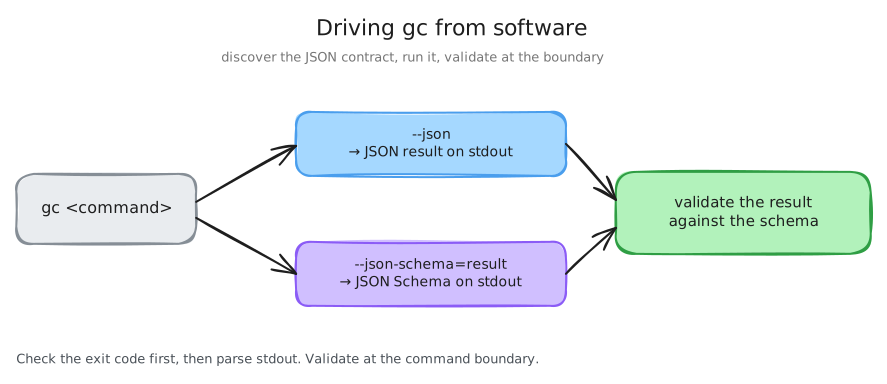
Tools can combine --json and --json-schema=result to validate command
output. Start by fetching the schema and command result:
schema="$(gc status --json-schema=result)"
result="$(gc status --json)"
printf '%s\n' "$result" | jq .
The jq command only confirms that stdout is parseable JSON. Use a JSON Schema
validator when you need contract enforcement. Keep validation at command
boundaries rather than writing ad hoc field checks throughout an agent or
script.
For streaming commands, validate each JSONL record against the result schema:
gc events --json-schema=result > /tmp/gc-events.schema.json
gc events --json --follow | while IFS= read -r line; do
  printf '%s\n' "$line" | jq .
done
The example above only parses records with jq; use a schema validator when
you need full schema checking.
Supported Surface
The JSON rollup added or standardized coverage across the main automation surface, including:
- city lifecycle and status commands.
- agent and rig inspection/routing commands.
- session list, action, log, and mutation commands.
- mail and trace inspection commands.
- convoy, converge, formula, order, graph, service, and skill commands.
- runtime drain/nudge commands.
- schema discovery for supported commands.
Use the generated CLI Reference for exact flags on each
command. Use gc <command> --json-schema to confirm whether a command declares
JSON support.
Passthrough Commands
Some commands pass arguments through to another CLI. For example, gc bd ...
routes to the bead CLI in the correct city or rig context.
Passthrough commands are not native gc JSON contracts. If the downstream tool
supports JSON, it owns that output shape. Gas City should not represent
passthrough output with a fake "anything is valid" schema.
For compatibility, local pack-defined commands can still pass their own --json
handling through when they do not declare schemas. Set
GC_JSON_CONTRACT_STRICT=1 in tests or CI when you want missing local command
schemas to fail instead of passing through.
Pack-Defined Commands
Pack-defined commands can be scripts or external programs, so Gas City does not automatically make arbitrary pack command output JSON-safe.
Pack command schemas live next to the command implementation:
commands/
  review/
    pr/
      run.sh
      schemas/
        result.schema.json
Nested command directories imply nested command paths. In the example above,
the result schema belongs to the pack command leaf represented by
commands/review/pr/.
schemas/failure.schema.json is optional. Use it only when the command has
meaningful command-specific failure fields beyond the shared default failure
shape.
Compatibility Notes
JSON output is an automation contract. A PR that changes an existing JSON output shape should call that out explicitly, including:
- the command and invocation.
- the old shape.
- the new shape.
- whether the change is additive or intentionally incompatible.
- the rationale for making the change in that PR.
Human-readable output remains the default and should stay compatible unless a command's normal human behavior is intentionally changed.
Related Reference
Use the generated CLI Reference for exact command flags.
Use Events for the gc events JSONL event contract.
Use Schemas for published non-CLI schema artifacts such as OpenAPI,
events, and city config.