本页还没有译文
本页 44 段还没译成Español,下面显示的是英文原文。DSPy - Observability & Tracing
还没翻译译自英文(langfuse.com)本页 44 段都还没译
This cookbook demonstrates how to use DSPy with Langfuse.
What is DSPy? DSPy is a framework that systematically optimizes language model prompts and weights, making it easier to build and refine complex systems with LMs by automating the tuning process and improving reliability. For further information on DSPy, please visit the documentation.
What is Langfuse? Langfuse is an open-source AI engineering platform. It offers tracing and monitoring capabilities for LLM applications. Langfuse helps developers debug, analyze, and optimize their AI systems by providing detailed insights and integrating with a wide array of tools and frameworks through native integrations, OpenTelemetry, and dedicated SDKs. Use Langfuse Cloud (hosted by Langfuse, free tier, no infrastructure to run) or self-host it.
Prerequisites
Install the latest versions of DSPy and langfuse.
%pip install langfuse dspy openinference-instrumentation-dspy -UStep 1: Setup Langfuse Environment Variables
First, we configure the environment variables. We set the OpenTelemetry endpoint, protocol, and authorization headers so that the traces from DSPy are correctly sent to Langfuse. You can get your Langfuse API keys by signing up for Langfuse Cloud or self-hosting Langfuse.
import os

# Get keys for your project from the project settings page: https://cloud.langfuse.com
os.environ.setdefault("LANGFUSE_PUBLIC_KEY", "pk-lf-...");
os.environ.setdefault("LANGFUSE_SECRET_KEY", "sk-lf-...");
os.environ.setdefault("LANGFUSE_BASE_URL", "https://cloud.langfuse.com"); # 🇪🇺 EU region
# Other Langfuse data regions include 🇺🇸 US: https://us.cloud.langfuse.com, 🇯🇵 Japan: https://jp.cloud.langfuse.com and ⚕️ HIPAA: https://hipaa.cloud.langfuse.com

# Your OpenAI key
os.environ.setdefault("OPENAI_API_KEY", "sk-proj-...");
With the environment variables set, we can now initialize the Langfuse client. get_client() initializes the Langfuse client using the credentials provided in the environment variables.
from langfuse import get_client

langfuse = get_client()

# Verify connection
if langfuse.auth_check():
    print("Langfuse client is authenticated and ready!")
else:
    print("Authentication failed. Please check your credentials and host.")
Step 2: Enable Tracing for DSPy
Next, we use the OpenInference Instrumentation module for DSPy to automatically capture your DSPy traces. This is done by a single call which instruments DSPy’s LM calls.
from openinference.instrumentation.dspy import DSPyInstrumentor

DSPyInstrumentor().instrument()
Step 3: Configure DSPy
Next, we set up DSPy. This involves initializing a language model and configuring DSPy to use it. You can then run various DSPy modules that showcase its features.
import dspy
lm = dspy.LM('openai/gpt-4o-mini')
dspy.configure(lm=lm)
Step 4: Running DSPy Modules with Observability
Here are a few examples from the DSPy documentation showing core features. Each example automatically sends trace data to Langfuse.
Example 1: Using the Chain-of-Thought Module (Math Reasoning)
math = dspy.ChainOfThought("question -> answer: float")
math(question="Two dice are tossed. What is the probability that the sum equals two?")
Example 2: Building a RAG Pipeline
def search_wikipedia(query: str) -> list[str]:
    results = dspy.ColBERTv2(url='http://20.102.90.50:2017/wiki17_abstracts')(query, k=3)
    return [x['text'] for x in results]

rag = dspy.ChainOfThought('context, question -> response')

question = "What's the name of the castle that David Gregory inherited?"
rag(context=search_wikipedia(question), question=question)
Example 3: Running a Classification Module with DSPy Signatures
def evaluate_math(expression: str):
    return dspy.PythonInterpreter({}).execute(expression)

def search_wikipedia(query: str):
    results = dspy.ColBERTv2(url='http://20.102.90.50:2017/wiki17_abstracts')(query, k=3)
    return [x['text'] for x in results]

react = dspy.ReAct("question -> answer: float", tools=[evaluate_math, search_wikipedia])

pred = react(question="What is 9362158 divided by the year of birth of David Gregory of Kinnairdy castle?")
print(pred.answer)
Step 5: Viewing Traces in Langfuse
After running your DSPy application, you can inspect the traced events in Langfuse:
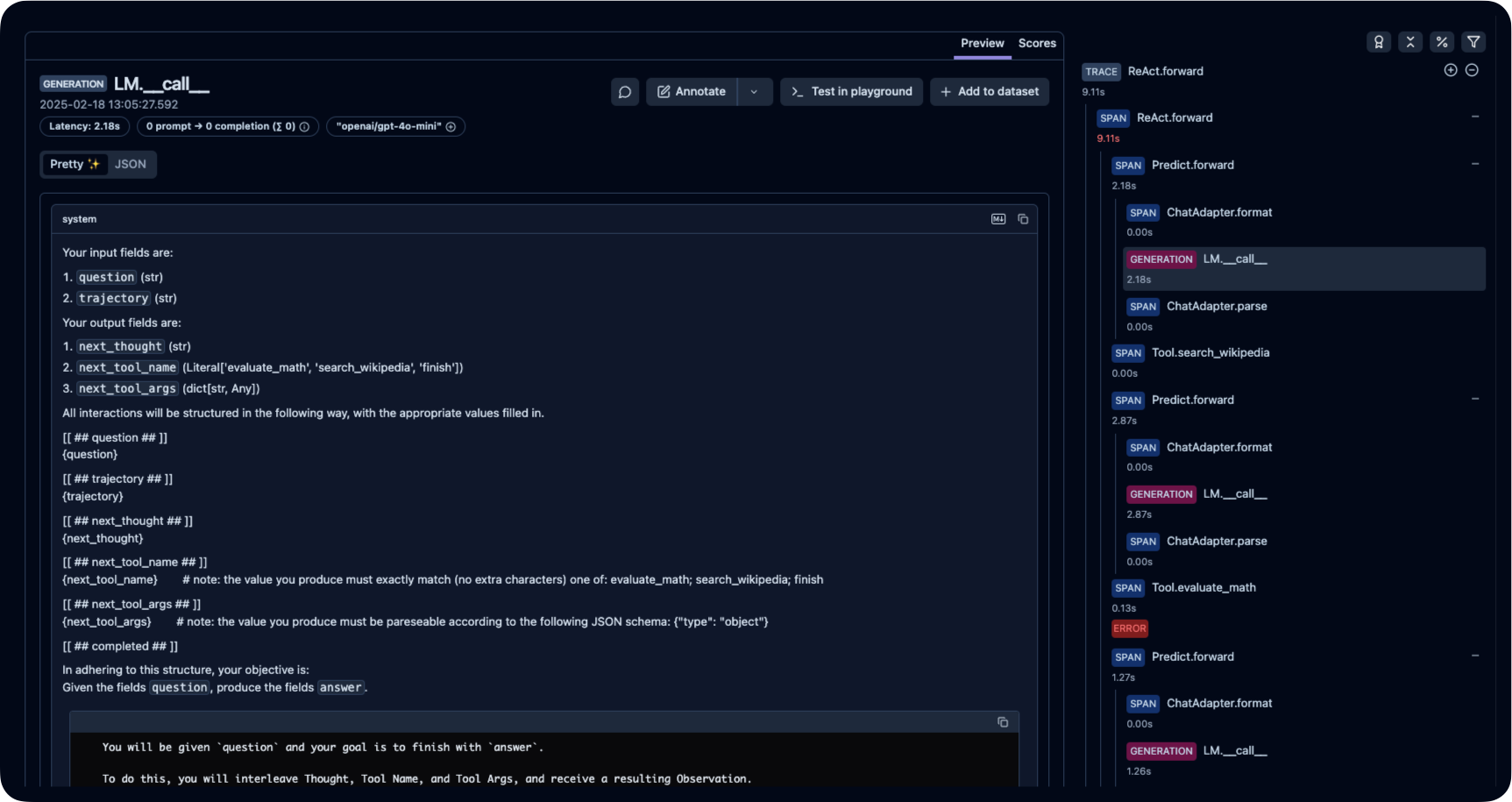
Public example trace link in Langfuse
Interoperability with the Python SDK
You can use this integration together with the Langfuse SDKs to add additional attributes to the observation.
The @observe() decorator provides a convenient way to automatically wrap your instrumented code and add additional attributes to the observation.
from langfuse import observe, propagate_attributes, get_client

langfuse = get_client()

@observe()
def my_llm_pipeline(input):
    # Add additional attributes (user_id, session_id, metadata, version, tags) to all spans created within this execution scope
    with propagate_attributes(
        user_id="user_123",
        session_id="session_abc",
        tags=["agent", "my-observation"],
        metadata={"email": "user@langfuse.com"},
        version="1.0.0"
    ):

        # YOUR APPLICATION CODE HERE
        result = call_llm(input)

        return result

# Run the function
my_llm_pipeline("Hi")
Learn more about using the Decorator in the Langfuse SDK instrumentation docs.
The Context Manager allows you to wrap your instrumented code using context managers (with with statements), which allows you to add additional attributes to the observation.
from langfuse import get_client, propagate_attributes

langfuse = get_client()

with langfuse.start_as_current_observation(
    as_type="span",
    name="my-observation",
    trace_context={"trace_id": "abcdef1234567890abcdef1234567890"},  # Must be 32 hex chars
) as observation:

    # Add additional attributes (user_id, session_id, metadata, version, tags)
    # to all observations created within this execution scope
    with propagate_attributes(
        user_id="user_123",
        session_id="session_abc",
        metadata={"experiment": "variant_a", "env": "prod"},
        version="1.0",
    ):
        # YOUR APPLICATION CODE HERE
        result = call_llm("some input")

# Flush events in short-lived applications
langfuse.flush()
Learn more about using the Context Manager in the Langfuse SDK instrumentation docs.
Troubleshooting
Next Steps
Once you have instrumented your code, you can manage, evaluate and debug your application:
Manage prompts in Langfuse Add evaluation scores Run LLM-as-a-judge Evaluators Create datasets Create custom dashboards Test queries in the Playground