本页还没有译文
本页 66 段还没译成繁體中文,下面显示的是英文原文。Tutorial 05 - Formulas
还没翻译译自英文(docs.gascity.com)本页 66 段都还没译
So far you've slung work one piece at a time — gc sling my-agent "do this thing". Real workflows have multiple steps with dependencies between them. A
formula captures that whole job as a unit and dispatches it as one.
A formula is a TOML file that records how a piece of work should be done — a collection of steps with dependencies, variables, and optional control flow. It isn't the work itself (that's a bead); it's the reusable method. Running a formula produces a workflow: a graph of step beads that Gas City's orchestrator routes to agents, gates on dependencies, retries on failure, and drives to completion in the background. You write down the method once; the orchestrator coordinates the doing — fanning ready steps out to as many agents as you have.
A simple formula
Formula files use the .toml extension and live in your city's
formulas/ directory. To follow along, write a pancakes recipe into that
directory:
~/my-city
$ cat > formulas/pancakes.toml << 'EOF'
formula = "pancakes"
description = "Make pancakes from scratch"

[requires]
formula_compiler = ">=2.0.0"

[[steps]]
id = "dry"
title = "Mix dry ingredients"
description = "Combine flour, sugar, baking powder, salt in a large bowl."

[[steps]]
id = "wet"
title = "Mix wet ingredients"
description = "Whisk eggs, milk, and melted butter together."

[[steps]]
id = "combine"
title = "Combine wet and dry"
description = "Fold wet ingredients into dry. Do not overmix."
needs = ["dry", "wet"]

[[steps]]
id = "cook"
title = "Cook the pancakes"
description = "Heat griddle to 375F. Pour 1/4 cup batter per pancake."
needs = ["combine"]

[[steps]]
id = "serve"
title = "Serve"
description = "Stack pancakes on a plate with butter and syrup."
needs = ["cook"]
EOF
The [requires] block opts this formula into the formulas v2 graph
compiler: every step becomes its own independently routable bead, and runtime
constructs like checks and retries (below) become available. Every formula in
this tutorial declares it, and yours should too. The reference compares the
contracts side by side:
Choosing a Compiler Contract.
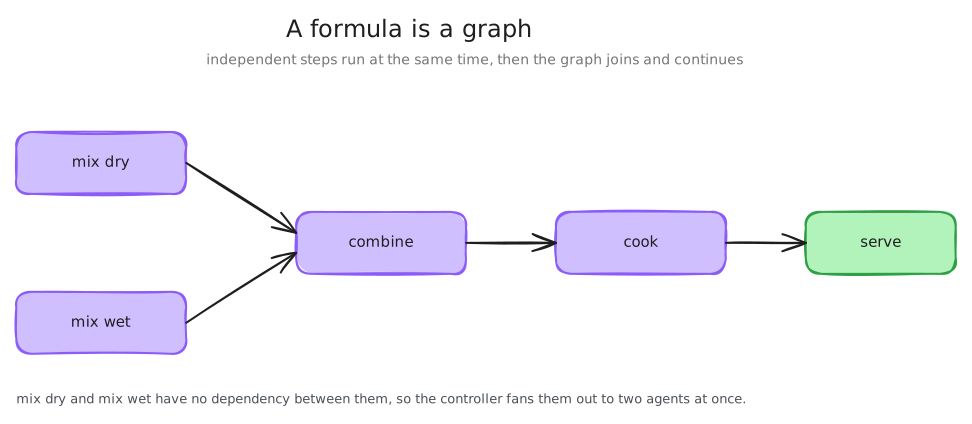
The needs field declares dependencies between sibling steps. dry and wet
have no needs, so they run in parallel; combine waits for both; cook
waits for combine; serve waits for cook. Without needs, every step
could run at any time — a messy kitchen, not a stack of pancakes.
Inspecting formulas
gc formula list enumerates the formulas your city can see.
~/my-city
$ gc formula list
mol-do-work
mol-dog-stale-db
mol-polecat-base
mol-polecat-commit
mol-polecat-report
mol-prompt-synth
mol-review-quorum
mol-scoped-work
pancakes
The mol-* entries are built-ins from the explicit imports gc init wrote —
the bundled core and bd/dolt system packs plus the default gascity
methodology pack (worker scaffolds, Dolt maintenance, and planning or
implementation workflows). The set may grow as pack releases change;
pancakes is the one you just defined.
To see the compiled recipe for a specific formula:
~/my-city
$ gc formula show pancakes
Formula: pancakes
Description: Make pancakes from scratch

Steps (6):
  ├── pancakes.dry: Mix dry ingredients
  ├── pancakes.wet: Mix wet ingredients
  ├── pancakes.combine: Combine wet and dry [needs: pancakes.dry, pancakes.wet]
  ├── pancakes.cook: Cook the pancakes [needs: pancakes.combine]
  ├── pancakes.serve: Serve [needs: pancakes.cook]
  └── pancakes.workflow-finalize: Finalize workflow [needs: pancakes.serve]
gc formula show compiles the formula — arranging steps and dependencies — and
displays the result. You wrote five steps, but the recipe shows six: the
compiler appends a workflow-finalize control step that depends on the last
steps in your graph. Agents never work on it; the orchestrator completes it once
everything upstream is done, recording the workflow's outcome and closing it.
For the next few examples, keep the mayor from earlier tutorials and add a
generic worker so you have a second execution target:
~/my-city
$ gc agent add --name worker
Scaffolded agent 'worker'

~/my-city
$ cat > agents/worker/prompt.template.md << 'EOF'
# Worker Agent
You are a general-purpose Gas City worker. Execute assigned work carefully and report the result.
EOF
Because the city already defaults to claude, this city-scoped worker does not
need an agent.toml yet. Add one later if you want provider, model, or
directory overrides.
Instantiating a formula
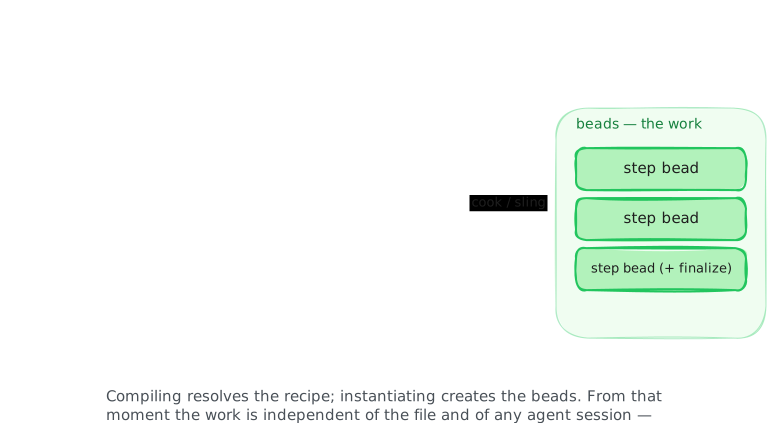
Slinging a formula compiles it, materializes the root and every step as beads, and routes the resulting workflow to an agent — all in one command.
~/my-city
$ gc sling mayor pancakes --formula
Started workflow mc-btj (formula "pancakes") → mayor
The root bead stays open — blocked on the finalize step — until every step
completes. Sling doesn't prompt the agent by default; pass --nudge to poke the
target immediately.
This is a different verb than Tutorial 01's sling. There, sling created a bead
from your prompt and attached a workflow from the agent's default formula
(Attached workflow ...). Here you sling the formula (the method) directly, so
sling starts a workflow, materializing its steps into beads (the work).
v1 formulas: wisps instead of workflows
With the v1 compiler, slinging a formula creates a wisp — an ephemeral molecule, a container bead holding its steps as children. You'll see that vocabulary in older formulas and messages; v2 formulas start workflows. Tutorial 06 shows how both shapes land in the bead store.
To create the workflow's beads without routing them — to inspect first, or
route the work yourself — use gc formula cook: same compilation, same beads,
no routing.
~/my-city
$ gc formula cook pancakes
Root: mc-79s
Created: 7
pancakes -> mc-79s
pancakes.combine -> mc-265
pancakes.cook -> mc-nia
pancakes.dry -> mc-b8g
pancakes.serve -> mc-k3q
pancakes.wet -> mc-0ez
pancakes.workflow-finalize -> mc-9vb

~/my-city
$ gc sling worker mc-79s
Auto-convoy mc-ygc
Slung mc-79s → worker
Created: 7 is the root plus your five steps plus the finalize step, each with
its own bead ID. Slinging the cooked root routes it like any other bead — and
because that's a plain bead sling, you get an auto-convoy tracking it (the
--formula path doesn't create one).
Cook in the scope where the work belongs. Running gc formula cook inside a rig
directory creates the beads in that rig's store (mp- prefixes for
my-project), and gc sling refuses to route a rig's bead to an agent that
reads a different store. We cooked in the city, so the city-scoped worker can
take it.
Variables
Like a function, a formula can be parameterized. Declare variables in a [vars]
section and reference them as {{name}} in step titles, descriptions, and other
text fields. They expand at cook or sling time — placeholders become concrete
values in the resulting beads.
In the simplest case, a variable is a name with a default value:
formula = "greeting"

[requires]
formula_compiler = ">=2.0.0"

[vars]
name = "world"

[[steps]]
id = "say-hello"
title = "Say hello to {{name}}"~/my-city
$ gc formula cook greeting --var name="Alice"
Root: mc-tmf
Created: 3
greeting -> mc-tmf
greeting.say-hello -> mc-oyr
greeting.workflow-finalize -> mc-5x2
~/my-city
$ gc formula cook greeting
Root: mc-h2g
Created: 3
greeting -> mc-h2g
greeting.say-hello -> mc-9qb
greeting.workflow-finalize -> mc-gxocook doesn't echo the substituted titles. To preview the expansion, use gc formula show:
~/my-city
$ gc formula show greeting --var name="Alice"
Formula: greeting

Variables:
  {{name}}:  (default=world)

Steps (2):
  ├── greeting.say-hello: Say hello to Alice
  └── greeting.workflow-finalize: Finalize workflow [needs: greeting.say-hello]
name = "world" makes "world" the default; without --var name, the variable
falls back to it. A variable with no default and no required flag leaves the
literal text {{name}} in the output — rarely what you want, so always give a
default or mark it required.
Variables can carry richer definitions:
| Field | Meaning |
|---|---|
description | Human-readable explanation |
required | Must be provided at instantiation time |
default | Used when the caller doesn't supply a value |
enum | Restrict to a set of allowed values |
pattern | Regex validation |
A more complete example:
formula = "feature-work"

[requires]
formula_compiler = ">=2.0.0"

[vars.title]
description = "What this feature is about"
required = true

[vars.branch]
description = "Target branch"
default = "main"

[vars.priority]
description = "How urgent is this"
default = "normal"
enum = ["low", "normal", "high", "critical"]

[[steps]]
id = "implement"
title = "Implement {{title}}"
description = "Work on {{title}} against {{branch}} (priority: {{priority}})"
Pass variables with --var:
~/my-city
$ gc formula cook feature-work --var title="Auth overhaul" --var branch="develop"
Root: mc-qnf
Created: 3
feature-work -> mc-qnf
feature-work.implement -> mc-35h
feature-work.workflow-finalize -> mc-2fp

~/my-city
$ gc formula cook feature-work --var title="Auth overhaul" --var priority="critical"
Root: mc-d1s
Created: 3
feature-work -> mc-d1s
feature-work.implement -> mc-ej5
feature-work.workflow-finalize -> mc-6gi
gc formula show previews the substituted recipe and the declared variables;
required ones get their own section:
~/my-city
$ gc formula show feature-work --var title="Auth system"
Formula: feature-work

Required vars:
  {{title}}: What this feature is about

Optional vars:
  {{branch}}: Target branch (default=main)
  {{priority}}: How urgent is this (default=normal)

Steps (2):
  ├── feature-work.implement: Implement Auth system
  └── feature-work.workflow-finalize: Finalize workflow [needs: feature-work.implement]
Variables stay as placeholders through the entire compilation pipeline,
substituted only when you create beads via cook or sling. That late binding
is what makes formulas reusable across contexts.
The dependency graph
needs gets more interesting as formulas grow. Steps fan out — multiple steps
depending on the same predecessor run in parallel:
[[steps]]
id = "design"
title = "Design the feature"

[[steps]]
id = "implement"
title = "Implement it"
needs = ["design"]

[[steps]]
id = "test"
title = "Test it"
needs = ["implement"]

[[steps]]
id = "review"
title = "Review the PR"
needs = ["implement"]
Here test and review both wait for implement but can run in parallel with
each other. The dependency graph is a DAG — the v2 compiler rejects
cycles at compile time.
Nested steps
When a formula gets large, you can group related steps under a parent:
[[steps]]
id = "backend"
title = "Backend work"

[[steps.children]]
id = "api"
title = "Build the API"

[[steps.children]]
id = "db"
title = "Set up the database"

[[steps]]
id = "frontend"
title = "Frontend work"
needs = ["backend"]
In the compiled recipe, the parent becomes an epic and its children are
namespaced under it (backend.api, backend.db). The grouping is purely
organizational: dependencies connect exactly the steps you name. needs = ["backend"] waits for the backend step itself, not its children — to wait for
the sub-steps, list them: needs = ["api", "db"]. You always reference steps by
their raw id; the compiler maps those to the namespaced recipe IDs.
Because you reference by raw id, those IDs must be unique across the whole
formula, children included — two parents can't each have a child called test;
validation rejects the duplicate.
Control flow
needs and children shape the order of work. Four more constructs control
whether a step runs at all, and how many times. Two resolve at compile time
(when you cook); two run at runtime (while the workflow executes):
| Construct | Resolves at | Controls |
|---|---|---|
condition | compile time | Whether a step is included, based on a variable |
loop | compile time | How many copies of a body are laid out (count/range) |
check | runtime | Re-dispatch until a validation script passes |
retry | runtime | Re-dispatch a step that fails for transient reasons |
Conditions
condition includes or excludes a step based on a variable set at sling or cook
time.
[[steps]]
id = "deploy"
title = "Deploy to staging"
condition = "{{env}} == staging"
Conditions use simple expressions: equality ({{var}} == value, {{var}} != value), plus truthiness — a bare {{var}} includes the step unless the value
is empty, false, 0, no, or off; !{{var}} inverts that. The variable is
substituted first, then compared as a string. For richer branching, use multiple
variables and conditions across steps.
gc formula show shows conditions taking effect. deploy-flow is an
unconditional build step plus the conditional deploy above:
~/my-city
$ gc formula show deploy-flow --var env=dev
Formula: deploy-flow

Variables:
  {{env}}:  (default=dev)

Steps (2):
  ├── deploy-flow.build: Build
  └── deploy-flow.workflow-finalize: Finalize workflow [needs: deploy-flow.build]

~/my-city
$ gc formula show deploy-flow --var env=staging
Formula: deploy-flow

Variables:
  {{env}}:  (default=dev)

Steps (3):
  ├── deploy-flow.build: Build
  ├── deploy-flow.deploy: Deploy to staging
  └── deploy-flow.workflow-finalize: Finalize workflow [needs: deploy-flow.build, deploy-flow.deploy]
Loops
A step can wrap a body of sub-steps that execute multiple times:
[[steps]]
id = "retries"
title = "Attempt deployment"

[steps.loop]
count = 3

[[steps.loop.body]]
id = "attempt"
title = "Try to deploy"
Save that as a formula named retry-deploy — with the formula line and
[requires] block, like every formula in this tutorial. The body is expanded
at cook time into three sequential iterations:
~/my-city
$ gc formula show retry-deploy
Formula: retry-deploy

Steps (4):
  ├── retry-deploy.retries.iter1.attempt: Try to deploy
  ├── retry-deploy.retries.iter2.attempt: Try to deploy [needs: retry-deploy.retries.iter1.attempt]
  ├── retry-deploy.retries.iter3.attempt: Try to deploy [needs: retry-deploy.retries.iter2.attempt]
  └── retry-deploy.workflow-finalize: Finalize workflow [needs: retry-deploy.retries.iter3.attempt]
Each iteration is its own step, chained sequentially. Every iteration is baked
into the recipe up front, so a count loop can't end early. A loop takes exactly
one of count, until, or range; range = "1..3" with var = "n" is a
compile-time cousin of count that exposes {n} for substitution in the body.
When you mean "keep trying until it works," use Check below.
Note
count accepts an integer literal only — template variables such as {{var}} are
not supported in count. For a variable-driven iteration count, use
range = "1..{n}" with var = "n" instead.
The `until` loop and its caveat
An until loop expands one iteration at compile time and stamps the condition
(plus a required max budget) on it:
[[steps]]
id = "poll"
title = "Poll for readiness"

[steps.loop]
until = "probe.status == 'complete'"
max = 5

[[steps.loop.body]]
id = "probe"
title = "Probe the endpoint"~/my-city
$ gc formula show poll-until
Formula: poll-until
Steps (2):
├── poll-until.poll.iter1.probe: Probe the endpoint
└── poll-until.workflow-finalize: Finalize workflow [needs: poll-until.poll.iter1.probe]The caveat: nothing re-runs the body yet. Cooking validates the condition, but no
component in the current release — v1 or v2 — reads it back at runtime, so an
until loop runs exactly one iteration. Treat it as declared intent; use Check
for keep-trying-until-it-passes behavior today. The condition is not the
{{var}} syntax from Conditions — it's an expression over step state, like
probe.status == 'complete'. The
Loops spec section covers the
grammar.
Check
Conditions and loops are decided when you cook. Check makes a decision at runtime: it runs a validation script after the agent finishes a step. If the script passes, the step is done; if not, another iteration is spawned and the agent tries again — a runtime feedback loop, not a compile-time expansion.
formula = "checked"

[requires]
formula_compiler = ">=2.0.0"

[[steps]]
id = "implement"
title = "Implement the feature"

[steps.check]
max_attempts = 2

[steps.check.check]
mode = "exec"
path = "scripts/verify.sh"
timeout = "30s"
Check is v2-only: without the [requires] block, compilation fails with an
error telling you to add it. The runtime loop shows up in the compiled recipe:
~/my-city
$ gc formula show checked
Formula: checked

Steps (4):
  ├── checked.implement.spec: Step spec for Implement the feature (spec)
  ├── checked.implement.iteration.1: Implement the feature
  ├── checked.implement: Implement the feature [needs: checked.implement.iteration.1]
  └── checked.workflow-finalize: Finalize workflow [needs: checked.implement]
The compiler unrolled your one step into a runtime machine: a spec sidecar
recording the original instructions, a first iteration for the agent, and a
control step keeping the original implement ID. When an iteration closes, Gas
City runs scripts/verify.sh; exit 0 means done, non-zero spawns another
iteration — up to max_attempts total. If all attempts fail, the step fails.
Retry
Where Check decides pass/fail with a script, [steps.retry] handles the simpler
case — a step that sometimes fails for transient reasons and should just be
re-dispatched:
[[steps]]
id = "fetch"
title = "Fetch the dataset"

[steps.retry]
max_attempts = 3
on_exhausted = "soft_fail"
No script: when an attempt fails transiently, the orchestrator dispatches another,
up to max_attempts. on_exhausted decides what happens when the budget runs
out — "hard_fail" (the default) fails the step, "soft_fail" records the
failure but lets the workflow continue.
The orchestrator owns these runtime loops, deciding when to re-dispatch, fan out,
or finalize without you in the session. More constructs exist: drain scatters
a convoy of work items into per-item runs, and on_complete/tally fan out
follow-up work over a step's output and aggregate the results. The v2 spec's
Runtime section covers the full
set.
What's next
- The six primitives — the canonical model formulas and the work they produce build on
- Formula spec (v2) — the complete surface: every top-level key, every step field, and the v2 runtime constructs
- Beads — the universal work primitive underneath formulas, sessions, and everything else
- Orders — formulas with scheduling triggers for periodic dispatch