本页还没有译文
本页 74 段还没译成한국어,下面显示的是英文原文。Understanding Packs
还没翻译译自英文(docs.gascity.com)本页 74 段都还没译
Every reusable capability in Gas City comes from a pack. A pack tells Gas City what can be loaded: agents, formulas, and orders, along with skills, commands, MCP configuration, defaults, the per-agent named-session config that keeps an agent persistent, and the files those definitions need while running. Pack is the primitive that CONFIGURES; the City is the local (root) pack, and it imports shared packs.
This guide covers the pack model — what a pack is, where its definitions live,
and how imports become city behavior — then the registry workflow for finding,
importing, and validating a pack with gc. The
pack specification is the source of truth for the
exact format.
The Pack Model
A pack is a directory with a pack.toml file. Only pack.toml is required,
but most useful packs also include agents, prompt templates, formulas, orders,
commands, doctor checks, skills, MCP configuration, or support files.
Here is a small pack:
review-pack/
  pack.toml
  agents/
    reviewer/
      agent.toml
      prompt.md
  formulas/
    review.toml
The pack.toml file names the pack:
[pack]
name = "review-pack"
schema = 2
version = "1.0.0"
The agent definition lives in agents/reviewer/agent.toml:
scope = "city"
provider = "codex"
default_sling_formula = "review"
The agent directory gives the agent its local name, reviewer. Because the
directory contains prompt.md, the loader discovers that prompt by convention.
If another city imports this pack, it does not need to copy prompt.md; the
file still belongs to the pack that declared it.
The City is itself a pack — the local (root) pack, rooted at the city directory
next to city.toml. It holds the city's reusable definitions, imports, and
local pack metadata, and imports shared packs.
If the loader cannot understand a pack's schema, it rejects the whole pack
rather than loading part of it.
Why Import A Pack?
Import a pack when you want to reuse behavior defined somewhere else without copying its files into your city.
For example, a review pack might provide:
- a
revieweragent - review formulas
- prompt fragments
- setup scripts
- doctor checks
When the city pack imports the review pack, those definitions become available to the city according to the imported pack's scope rules.
city pack
  pack.toml
    [imports.review] ──► review pack
                         agents/reviewer/
                         formulas/review.toml
Registries, Handles, And Sources
A registry is a local catalog of reusable packs. You use a registry handle to find a pack on your machine, but you commit a durable source to import it — so another machine resolves the pack from the committed source, not your registry name:
| Value | Example | Used in |
|---|---|---|
| Registry handle | main:gascity | gc pack registry commands (search, show). main is this machine's registry name — another machine could call it work. |
| Durable source | https://github.com/gastownhall/gascity-packs/tree/main/gascity | Checked-in import TOML. Independent of any machine's registry name or cache. |
For a GitHub-hosted pack, use a browser-dereferenceable tree URL:
[imports.gascity]
# clone gastownhall/gascity-packs, use the gascity/ dir on the main branch as the pack root
source = "https://github.com/gastownhall/gascity-packs/tree/main/gascity"
The same URL also opens the pack directory in a browser.
City Imports And Rig Imports
A city-level import belongs to the city pack and appears at the top level of
the city pack's pack.toml:
[imports.gascity]
source = "https://github.com/gastownhall/gascity-packs/tree/main/gascity"
version = "^0.1"
If that pack defines a city-scoped agent named planner, the loader stamps it
with the import binding, and the runtime agent is named:
gascity.plannerA rig-level import appears under the [[rigs]] table that needs it:
[[rigs]]
name = "checkout-service"
path = "../checkout-service"

[rigs.imports.gascity]
source = "https://github.com/gastownhall/gascity-packs/tree/main/gascity"
version = "^0.1"
If that same pack defines a rig-scoped agent named planner, the runtime agent
is stamped with the rig name as well as the binding:
checkout-service/gascity.plannerThe rig name becomes the identity prefix. The rig path is the filesystem
location of the project. These are different pieces of information.
Agent Scope
An agent in a pack can say where it is allowed to load.
scope = "city"
provider = "codex"
prompt_template = "prompt.md"
The scope field has three useful states.
| Scope | Meaning |
|---|---|
| omitted | The agent is eligible for city-level and rig-level loading. |
city | The agent loads only when the pack is imported at the city level. |
rig | The agent loads only when the pack is imported for a rig. |
The scope says where the definition is available. It does not name a particular rig. A rig-scoped agent becomes part of a rig only when that rig imports the pack.
Names
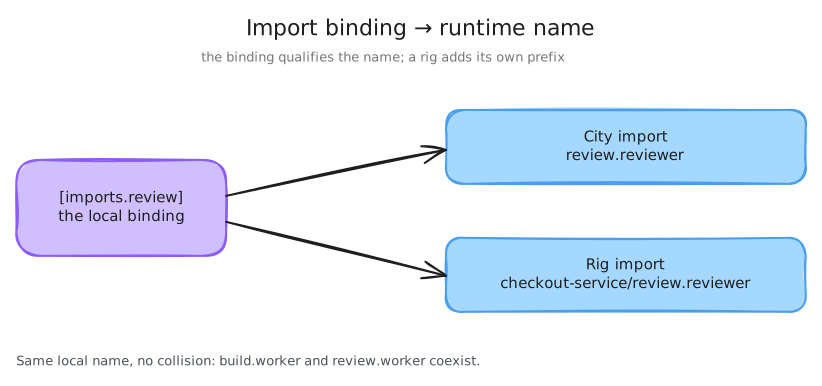
Because the import binding qualifies every imported agent name (as
gascity.planner above), you address imported agents by that qualified name —
not bare planner — in patches, targets, and commands, and the imported pack's
own name never overrides the binding.
Two imports that define agents with the same local name therefore coexist:
build.worker and review.worker do not collide. Config load fails only when
two source directories produce the same qualified name on the same surface — for
example, two unbound legacy includes that both define a city-level reviewer.
Defaults And Patches
Defaults fill in blanks after packs have loaded. Root city defaults belong in
city.toml, and pack-scoped defaults can be declared in pack.toml for agents
loaded from that pack. Pack-scoped defaults follow the precedence rules in the
pack spec: explicit agent fields win, bound imports preserve inherited pack
defaults, and unbound legacy includes yield to root city defaults.
[agent_defaults]
default_sling_formula = "review"
This default applies only to agents whose default_sling_formula is still
blank. If a pack explicitly sets the field on an agent, the explicit value
wins.
A patch changes an agent that already exists. It does not create a new agent. Imported agents are targeted by their binding-qualified name:
[[patches.agent]]
name = "review_tools.reviewer"
provider = "codex"
session_setup_append = ["tmux set status-left '[review]'"]
For a rig-scoped agent, use dir to select the rig identity prefix:
[[patches.agent]]
dir = "checkout-service"
name = "review_tools.reviewer"
provider = "codex"
Here, dir is the rig name, not the rig path.
Loading Order
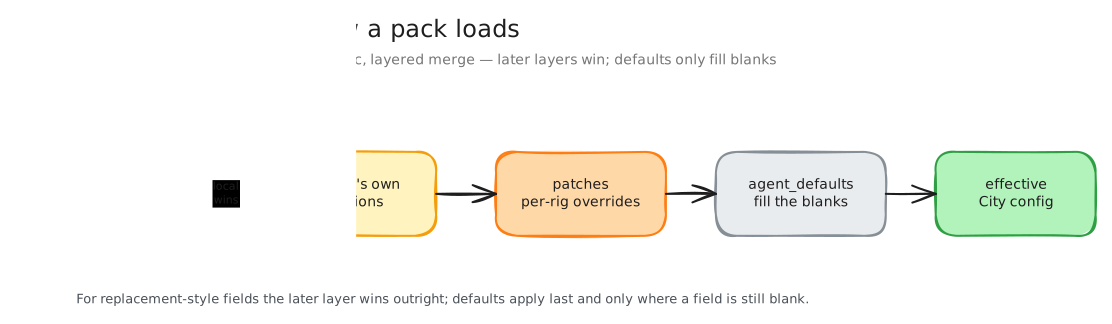
The loader applies packs, patches, and defaults in a deterministic order, which decides the winner when two layers set the same field:
city.toml + city pack
  → imported packs (+ their pack-level patches)
  → city-level imports → city-level patches
  → rig-level imports (stamp rig agents) → rig overrides
  → pack globals
  → city agent defaults (blank fields only)
The later operation wins for replacement-style fields. Defaults run last but only fill blanks, so they never override an explicit value from an earlier layer.
Choosing Where To Put A Change
When you customize a pack, choose the narrowest place that expresses what you mean.
| If you want to... | Put it here |
|---|---|
| Reuse another pack | [imports.<binding>] with source and optional version. |
| Make a city-wide local policy | city.toml defaults or patches. |
| Change one city-level imported agent | city.toml [[patches.agent]]. |
| Change one rig-level imported agent | The rig's [[rigs.overrides]] or a targeted city patch with dir. |
| Ship reusable behavior | The pack's own definitions and support files. |
| Pin an exact resolved dependency | The lockfile, not the authored import. |
Pack CLI
Find A Pack
Search when you know the capability you want but not the pack name, then show a record to get paste-ready import commands:
$ gc pack registry search gascity
Registry  Name     Latest  Description
main      gascity  0.1.4   Gas City planning and implementation workflow pack.

$ gc pack registry show main:gascity
Pack:        main:gascity
Description: Gas City planning and implementation workflow pack.
Source:      https://github.com/gastownhall/gascity-packs/tree/main/gascity
Source kind: git
Latest:      0.1.4
Import commands:
  This version or later: gc import add https://github.com/gastownhall/gascity-packs/tree/main/gascity --name gascity --version '>=0.1.4'
  Exactly this version:  gc import add https://github.com/gastownhall/gascity-packs/tree/main/gascity --name gascity --version 0.1.4
Releases:
  0.1.1 main 788b6e8ec224
  0.1.2 main 5fc675b85d4a
  0.1.3 main af1640917a24
  0.1.4 main 99464ed9240b
The first import command accepts the shown release or any newer match; the
second pins it exactly. Both write durable import TOML from the Source line
and the selected version — the registry handle stays out of the file.
Install Or Check Imports
After changing remote imports, install resolves the declared imports, writes or
repairs packs.lock, and materializes the packs in the local cache:
$ gc import installgc import check is a read-only pass: it reports missing, stale, or uncached
import state and points back to gc import install for repair. Registry
commands are discovery only; they never sync the authored import graph.
$ gc import checkOnce install or check succeeds, validate the composed city and inspect what the pack provides:
$ gc config show --validate
$ gc config show | rg 'planner'
Private Packs And Credentials
A pack whose source (or a transitive import) is a private repository needs a
git credential. Credentials are never written into pack.toml, packs.lock, or
city.toml; they live in a separate, never-committed credentials.toml,
secret-by-pointer — the file records where to find the token, never the
token itself. Register one with gc import credential:
$ gc import credential add github.com/gascity --helper 'gh auth token'
$ gc import credential add github.com/gascity --token-file /var/run/secrets/git/token
$ gc import credential add github.com/gascity --token-env GC_GIT_TOKEN
$ gc import credential add github.com/gascity --ssh-key-file ~/.ssh/packbot_ed25519
The match argument is a bare host or host/path-prefix (longest-prefix wins,
so same-host different-org credentials coexist). Exactly one pointer flag is
required. By default the rule is written to <city>/.gc/credentials.toml
(0600); --global writes $GC_HOME/credentials.toml instead. gc refuses to
load a credentials.toml that is world-accessible or group-writable: the modes
it accepts are 0600/0400, plus the root-owned own-group 0440 that a Kubernetes
Secret volume mounted with fsGroup produces. List and remove registered rules
with:
$ gc import credential list
$ gc import credential remove github.com/gascity
Credential resolution layers, highest precedence first:
$GC_GIT_CREDENTIALS_FILE (replaces the file layers when set) →
<city>/.gc/credentials.toml → $GC_HOME/credentials.toml →
$GC_GIT_CREDENTIAL_COMMAND. A credentials.toml looks like:
[[credential]]
match    = "github.com/gascity"       # host or host/path-prefix
username = "x-access-token"           # optional; this is the default
# exactly one pointer — never a literal token:
helper       = "gh auth token"        # command whose stdout is the token
# token_file = "/var/run/secrets/git/token"
# token_env  = "GC_GIT_TOKEN"         # env var NAME, never a value
# ssh_key_file = "~/.ssh/packbot_ed25519"
When a rule matches an import's host, gc import add/install/upgrade (and
gc rig add, gc doctor --fix) authenticate the clone automatically; when no
rule matches, public imports behave exactly as before. If a private import
fails to authenticate, gc prints a hint: line pointing at
gc import credential add. Never embed user:token@ in a source URL — gc
rejects it because the credential would leak into city.toml, packs.lock, the
shared cache's .git/config, and error output.
Version constraints and the lockfile
The [pack].version field is pack metadata. Import version selection comes
from the importing file and the lockfile, not from comparing [pack].version
during load. An import can express the selected revision three ways:
# no constraint — installer and lockfile choose the revision
[imports.gascity]
source = "https://github.com/gastownhall/gascity-packs/tree/main/gascity"

# semver constraint — any compatible release is acceptable
version = "^0.1"

# exact SHA pin — this revision must be used
version = "sha:d3617d1319a1206ac85f69ba024ec395c49c6f4b"
The authored import expresses the source and optional constraint; the lockfile records the exact resolved state. Once the cache and lockfile are current, city loading uses the local resolved pack instead of re-fetching the remote source.
Registry State Is Local
Registry commands manage local discovery state. Pack imports manage shared city state.
| Task | Command or file |
|---|---|
| See configured catalogs | gc pack registry list |
| Refresh cached catalog records | gc pack registry refresh |
| Search for a reusable pack | gc pack registry search |
| Inspect a registry record | gc pack registry show |
| Submit a pack publish request | gc pack registry publish <path> |
| Share a chosen dependency with the team | [imports.<binding>] in checked-in TOML |
| Install or repair authored imports | gc import install |
| Check installed import state without mutating | gc import check |
| Validate the composed city | gc config show --validate |
This separation keeps local discovery flexible without making shared config depend on the names or cache layout of one machine.
Registry Freshness
Registry catalogs are cached locally. gc pack registry search and
gc pack registry show read that cache unless you pass --refresh, and they
warn when a configured registry cache is older than the freshness window.
By default, a registry cache is considered fresh for 24 hours. Set
GC_REGISTRY_FRESHNESS to a positive Go duration string when you need a
different window:
GC_REGISTRY_FRESHNESS=1h gc pack registry search gascityInvalid, zero, or negative values produce a warning and leave the command
without a custom freshness window. Use --refresh when you want a command to
fetch the latest catalog before reading it:
gc pack registry search gascity --refresh
gc pack registry show main:gascity --refresh
Freshness affects discovery, not authored imports. A stale registry cache can
hide a newly published pack record from search/show output, but shared
pack.toml still stores durable import source and version values.