本页还没有译文
本页 72 段还没译成日本語,下面显示的是英文原文。Tutorial 07 - Orders
还没翻译译自英文(docs.gascity.com)本页 72 段都还没译
Formulas describe what work looks like. Orders describe when it should
happen. An order pairs a trigger with an action — a formula or a shell script.
The orchestrator (gc start launches it) wakes every 30 seconds — a tick —
and evaluates each order's trigger. When a trigger opens, the order fires, no
human dispatch needed.
For a v2 formula, firing hands the whole job to the orchestrator: it decomposes
the formula into a graph of beads, fans the ready steps out across the pool's
agents, gates each step on its dependencies, retries failures, and drives the
graph to completion outside any session — now on a schedule or in response to
events instead of a person typing gc sling.
This page assumes my-city is running with agents and formulas configured (as
built up through Tutorial 06).
A simple order
Orders live in an orders/ directory at the top level of your city, alongside
formulas/ and agents/ — the local (root) pack's own contents, the same
structure an imported pack provides. An order imported from a shared pack reads
exactly like a local one. See primitives for how packs,
formulas, agents, and orders relate.
orders/
  pancakes-check.toml
  dep-update.toml
formulas/
  pancakes.toml
Here's a minimal order that dispatches the pancakes formula from
Tutorial 05 every five minutes:
# orders/pancakes-check.toml
[order]
description = "Cook pancakes on a timer"
formula = "pancakes"
trigger = "cooldown"
interval = "5m"
pool = "worker"
The pool field tells the orchestrator where to send the work. A pool is a
named group of agents that share a work queue (you saw the bundled dolt.dog
pool in Tutorial 01); a single agent's name works as a pool target too, so the
examples here route to the worker agent from Tutorial 05. When the order
fires, the orchestrator runs the formula and writes gc.routed_to=worker on the
resulting work beads — the marker that the pool's bd ready query and the
supervisor's scale_check both read. Any agent in the pool can then pick the
work up.
The order name comes from the file basename (pancakes-check.toml →
pancakes-check), not from anything in the TOML.
A scaled-from-zero pool only wakes if the order produces work that is
immediately Ready — beads with no open blockers. v2 formulas (anything
declaring [requires] formula_compiler = ">=2.0.0", see
Choosing a Compiler Contract)
guarantee this: their step beads route to the pool and any step with no open
blockers is Ready right away. Prefer v2 for new formulas.
Drop a new order file into orders/ and it shows up within a minute — the
orchestrator rescans the order set as it ticks, at most once per minute. No
restart needed.
Inspecting orders
Three commands show you what the orchestrator sees: which orders exist, what their triggers look like, and whether any are due.
gc order list shows every enabled order, whether or not it has ever fired:
~/my-city
$ gc order list
NAME                 TYPE     TRIGGER      INTERVAL/SCHED  TARGET
pancakes-check       formula  cooldown     5m              worker
dep-update           formula  cooldown     1h              worker
release-notes        formula  cooldown     24h             worker
Your output will also include built-in housekeeping orders that ship with the
bundled core pack (beads-health, gate-sweep, jsonl-export, reaper,
etc.). Leave them alone.
The TARGET column is the pool the order routes to (the field is still pool
in the TOML).
To see the full definition:
~/my-city
$ gc order show pancakes-check
Order:  pancakes-check
Description: Cook pancakes on a timer
Formula:     pancakes
Trigger:     cooldown
Interval:    5m
Target:      worker
Source:      /Users/you/my-city/orders/pancakes-check.toml
To check which orders are due right now:
~/my-city
$ gc order check
NAME                 TRIGGER      DUE   REASON
pancakes-check       cooldown     yes   never run
dep-update           cooldown     no    cooldown: 59m52s remaining
release-notes        cooldown     no    cooldown: 23h59m53s remaining
Running an order manually
Any order can be triggered by hand, bypassing its trigger:
~/my-city
$ gc order run pancakes-check
Order "pancakes-check" executed: wisp mc-2xz → gc.routed_to=worker
The bead ID (mc-2xz) is the dispatched work, stamped gc.routed_to=worker so
the pool sees it (wisp is the CLI's label for that v1 materialization). Exec
orders print Order "<name>" executed (exec). Use this to test a new order or
kick off work that's almost due anyway.
Trigger types
The trigger controls when an order fires. Each type reads one extra field
from [order]:
| Trigger | Fires when | Extra field | Example |
|---|---|---|---|
cooldown | interval elapsed since last run | interval (Go duration) | interval = "5m" |
cron | wall-clock matches the schedule | schedule (5-field cron) | schedule = "0 3 * * *" |
condition | a shell command exits 0 | check | check = "test -f /tmp/deploy-flag" |
event | a named event hits the event bus | on | on = "bead.closed" |
manual | never — only gc order run | (none) | — |
# orders/stale-branches.toml
[order]
description = "Check for stale feature branches"
formula = "stale-branches"
trigger = "cooldown"   # swap for cron / condition / event / manual
interval = "5m"        # ...and the matching extra field above
pool = "worker"
Notes per trigger:
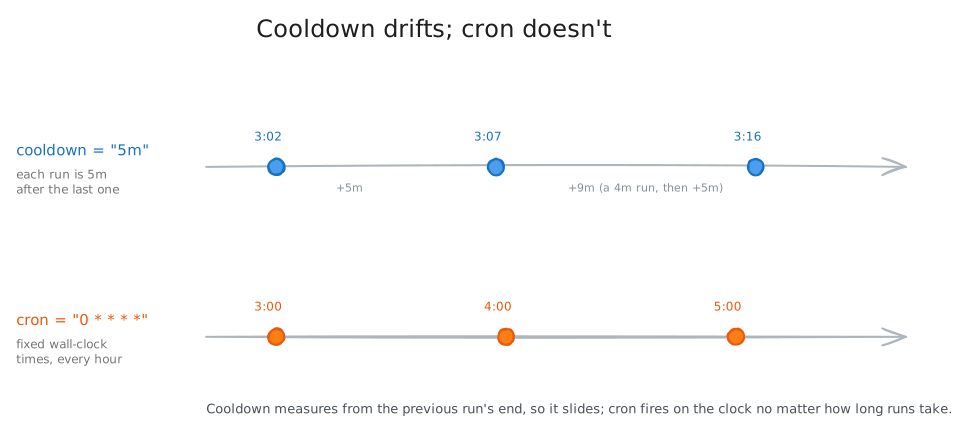
cooldown— fires immediately on the first tick if it has never run, then waitsintervalsince the last run. Drifts: a 3:02 run means the next is at 3:07.cron— a 5-field expression (minute, hour, day-of-month, month, day-of-week) supporting*, integers, comma lists (1,15), and*/Nsteps. Unlike cooldown it hits the same wall-clock times every day. Fires at most once per minute.condition— the orchestrator runssh -c "<check>"each tick, bounded by the order'scheck_timeout(a positive Go duration, default10s). This is separate fromtimeout, which bounds the dispatched formula/exec rather than the check. Use it for external state: check a file, ping an endpoint, query a database. The check runs synchronously, so a slow one delays the rest of the tick — keep it fast, or raisecheck_timeoutwhen a check must query a slow store (a check killed by its deadline never proves its condition, so the order would otherwise silently never fire).event— fires whenever the named event appears on the bus. Cursor-based tracking advances a sequence marker per firing, so the same event isn't processed twice.manual— shows up ingc order listandgc order check(always DUEno, reasonmanual trigger — use gc order run), but auto-fires never.
Formula orders vs. exec orders
An order's action is either a formula or a shell script. An exec order runs the script on the orchestrator — no agent, no LLM, no work beads — which is the right choice for purely mechanical work: pruning branches, running linters, checking disk usage.
[order]
description = "Delete branches already merged to main"
trigger = "cooldown"
interval = "5m"
exec = "scripts/prune-merged.sh"   # no pool — runs on the orchestrator
The rules:
- Every order has either
formulaorexec, never both. - Exec orders can't have a
pool— there's no agent pipeline to route to. - The script receives
ORDER_DIR(the directory containing the order file) in its environment; pack-sourced orders also getPACK_DIR. - An
[order.env]table exports extra environment variables into the script — handy for tuning thresholds without editing it.envis exec-only. - Default timeout is 30s for formula orders, 300s for exec orders.
Timeouts
Each order can set a timeout:
[order]
description = "Run the linter on changed files"
formula = "lint-check"
trigger = "cooldown"
interval = "30s"
pool = "worker"
timeout = "60s"
For formula orders, the timeout covers only the initial dispatch — compiling
the formula, materializing its work beads, and routing them to the pool. Once
dispatched, the orchestrator drives a v2 formula's steps to completion at each
agent's own pace; the order timeout never kills work mid-flight. For exec
orders, the timeout covers the full script execution — overrun, and the process
is killed. A global cap in city.toml:
[orders]
max_timeout = "120s"
The effective timeout is the lesser of the per-order timeout and the global cap.
Order scope
When a pack is imported into more than one rig, its orders instantiate once per rig by default — usually right for an order that acts on a single rig's work. But a sweep or health probe that already iterates over every rig internally would then run redundantly, once per rig.
Mark such an order city-scoped so it registers exactly once, no matter how many rigs import the pack:
[order]
description = "Sweep merged convoys across the whole city"
trigger = "cooldown"
interval = "5m"
exec = "scripts/convoy-sweep.sh"
scope = "city"          # "city" or "rig"; default "rig"
A scope = "city" order appears once in gc order list with no rig qualifier;
rig-scoped orders appear once per importing rig (mirroring scope on
[[named_session]]). A city-scoped order keeps the formula layer of the pack it
was scanned from, so its formula must resolve from that pack rather than from any
one rig's local orders/ directory.
Disabling and skipping orders
Set enabled = false in an order's own definition to drop it from scanning
entirely — it won't appear in gc order list or get evaluated:
[order]
description = "Temporarily disabled"
formula = "nightly-bench"
trigger = "cooldown"
interval = "1m"
pool = "worker"
enabled = false
Or skip orders by name in city.toml without editing their files — handy when
a pack provides orders you don't want running:
[orders]
skip = ["nightly-bench", "experimental-check"]
Overrides
When a pack's order is almost right, tweak it in city.toml instead of copying
the file:
[[orders.overrides]]
name = "test-suite"
interval = "1m"

[[orders.overrides]]
name = "release-notes"
pool = "mayor"
schedule = "0 6 * * *"
Overrides match by order name and can change enabled, trigger, interval,
schedule, check, on, pool, timeout, idempotent, and env. An
override targeting a nonexistent order is an error, not a silent no-op — gc order commands fail; gc start logs the error and continues with the unmatched
override skipped.
Order history
Every time an order fires, Gas City creates a tracking bead labeled with the order name. You can query the history:
~/my-city
$ gc order history
ORDER           BEAD     EXECUTED
pancakes-check  mc-3hb   2026-04-08T07:36:36Z
dep-update      mc-784   2026-04-08T06:48:12Z
pancakes-check  mc-zbd   2026-04-08T07:31:22Z
release-notes   mc-zb8   2026-04-07T13:00:01Z

~/my-city
$ gc order history pancakes-check
ORDER           BEAD     EXECUTED
pancakes-check  mc-3hb   2026-04-08T07:36:36Z
pancakes-check  mc-zbd   2026-04-08T07:31:22Z
pancakes-check  mc-9p8   2026-04-08T07:26:18Z
The tracking bead is created synchronously before the dispatch goroutine launches — which is what keeps the cooldown trigger from re-firing on the very next tick. The trigger checks for recent tracking beads when deciding if the order is due.
Duplicate prevention
Before dispatching, the orchestrator checks whether the order already has open (non-closed) work. If it does, the order is skipped even when the trigger says it's due — so a still-running pancakes batch doesn't get a second one piled on top.
The open-work check runs against the store with a bounded timeout; if the store
is so contended that the check times out, the order is skipped — it fails
closed. Orders whose dispatch is safe to repeat (sweeps and feeders where a
duplicate run is a no-op) can set idempotent = true to fail open instead:
on a gate timeout they dispatch anyway rather than starve.
A third option exists for orders that consume no bead work at all — pure
probes and sweeps that track nothing. no_work_gate = true skips the open-work
gate entirely; the dispatcher never issues the store read, so a slow store
cannot time it out and skip the order. The canonical case is
provider-health-probe, a cooldown probe whose only job is to refresh a health
cache; under store contention its gate timed out every cycle and the cache went
stale (#2893). no_work_gate and idempotent are distinct: idempotent
enters the gate but fails open on timeout, while no_work_gate never enters
it. Use no_work_gate only when the order genuinely tracks no beads — it
disables single-flight protection, so the order must be self-idempotent or
interval-bounded to guard against overlapping re-runs.
Rig-scoped orders
When a pack is applied to a rig, that pack's orders come along and run scoped to
that rig. Say a dev-ops pack includes a test-suite order:
packs/dev-ops/
  orders/
    test-suite.toml         # trigger = "cooldown", interval = "5m", pool = "worker"
  formulas/
    test-suite.toml
And your city applies that pack to two rigs:
# city.toml
[[rigs]]
name = "my-api"

[rigs.imports.dev_ops]
source = "./packs/dev-ops"

[[rigs]]
name = "my-frontend"

[rigs.imports.dev_ops]
source = "./packs/dev-ops"
# .gc/site.toml
[[rig]]
name = "my-api"
path = "../my-api"
[[rig]]
name = "my-frontend"
path = "../my-frontend"Now the city has the same order running independently for each rig:
~/my-city
$ gc order list
NAME                 TYPE     TRIGGER      INTERVAL/SCHED  RIG             TARGET
test-suite           formula  cooldown     5m              my-api          worker
test-suite           formula  cooldown     5m              my-frontend     worker
Two rows, same name, one per importing rig. As soon as any rig-scoped order
exists, gc order list adds a RIG column (city-level orders show -). To act
on a specific instance, pass --rig:
$ gc order show test-suite --rig my-api
$ gc order run test-suite --rig my-api
These are two independent orders — each copy has its own cooldown timer,
tracking beads, and history, distinguished internally by scoped name
(test-suite:rig:my-api vs test-suite:rig:my-frontend). The pool target is
auto-qualified at dispatch: pool = "worker" becomes
gc.routed_to=my-api/worker, routing work to the rig's own agents rather than
the city-level pool.
Order layering
When the same order name exists in both a pack and a local orders/ directory
within one scope (the city, or one rig), local wins and replaces the pack
definition entirely. So a city-level orders/test-suite.toml with a 1-minute
cooldown overrides the dev-ops pack's 5-minute test-suite — the pack version
is ignored.
Replacement never crosses scopes, though: a rig's test-suite doesn't replace a
city order of the same name. As the previous section showed, those coexist as
independent scoped instances (test-suite vs test-suite:rig:my-api).
Putting it together
Two orders: a frequent lint check (exec, no agent) and weekly release notes
(formula, dispatched to the worker agent from
Tutorial 05). The pieces are the two order files and
the formula they dispatch.
# orders/lint-check.toml
[order]
description = "Run the linter on changed files"
trigger = "cooldown"
interval = "30s"
exec = "scripts/lint-changed.sh"
timeout = "60s"
# orders/release-notes.toml
[order]
description = "Generate release notes from the week's merges"
formula = "release-notes"
trigger = "cron"
schedule = "0 9 * * 1"
pool = "worker"# formulas/release-notes.toml
formula = "release-notes"
[requires]
formula_compiler = ">=2.0.0"
[[steps]]
id = "gather"
title = "Gather merged PRs from the last week"
[[steps]]
id = "summarize"
title = "Write release notes"
needs = ["gather"]
[[steps]]
id = "post"
title = "Post release notes to the team channel"
needs = ["summarize"]~/my-city
$ gc start
City 'my-city' started
~/my-city
$ gc order list
NAME TYPE TRIGGER INTERVAL/SCHED TARGET
lint-check exec cooldown 30s -
release-notes formula cron 0 9 * * 1 worker
~/my-city
$ gc order check
NAME TRIGGER DUE REASON
lint-check cooldown yes never run
release-notes cron no cron: schedule not matchedThe lint check fires immediately (never run + cooldown = due), then every 30
seconds. The release notes fire Monday at 9 AM: the orchestrator compiles the
three-step formula into a graph, makes gather Ready, and routes step beads to
the worker pool; summarize unblocks only when gather closes, post only
after summarize. The orchestrator drives the sequence to completion — no one
types gc sling, no single session babysits the run.
That's the whole idea. An order binds a trigger to an action. For a v2 formula, the action is the full orchestration the orchestrator drives outside any session — now gated by time, schedule, condition, or event. For an exec script, it's a mechanical task on the same tick. Either way the orchestrator evaluates the trigger every tick and does the work for you.
What's next
This is the last tutorial in the series. From here, the reference pages and guides go deeper:
- Formula spec (v2) — the full formula file format, including the v2 runtime constructs your orders dispatch
- Understanding packs — how formulas, orders, agents, and prompts travel together as importable packs